By Caleb Morgan
Updated November 2026
Choosing an ergonomic chair for computer work comes down to a few measurable features: lumbar support that fits your lower back, a seat height range that lets your feet sit flat, adjustable armrests, and a backrest that reclines without locking you into one posture. This list compares five chairs against those criteria so you can narrow the field quickly.
Our top picks at a glance
- 1
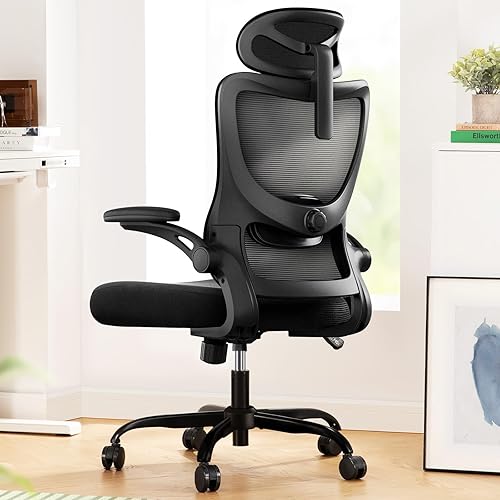 TOP CHOICEBest overallMarsail Ergonomic Office Chair: Office Desk Chair with High Back MeshView on Amazon
- 2
 TOP CHOICEBest for tight budgetsBestOffice Ergonomic Office Chair | Mid-Back Swivel Desk ChairView on Amazon
- 3
 TOP CHOICEBest for a clean, simple setupNEO CHAIR Office Computer Gaming Mid-Back Mesh Desk ChairView on Amazon
- 4
 Best for cushioned comfortGTPLAYER PU Leather Office Chair, Home Desk Chairs with Memory FoamView on Amazon
- 5
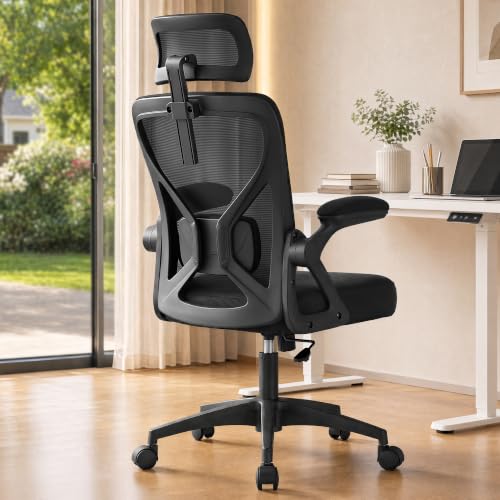 Best for taller usersSONGMICS Ergonomic Mesh Office Chair with Adjustable Lumbar SupportView on Amazon
Our Top Picks
Quick Comparison
| Product | Best for | Key feature |
|---|---|---|
| Marsail Ergonomic Office Chair | Overall fit and support | High mesh back, 3D armrests |
| BestOffice Ergonomic Office Chair | Tight budgets | Lumbar support, adjustable height |
| NEO CHAIR Mid-Back Mesh Desk Chair | Clean, simple setup | Breathable mesh, smooth casters |
| GTPLAYER PU Leather Office Chair | Cushioned comfort | Memory foam, flip-up arms |
| SONGMICS Ergonomic Mesh Office Chair | Taller users | Wide seat, 90–105° tilt |
Marsail Ergonomic Office Chair: Office Desk Chair with High Back Mesh and Adjustable Lumbar Support
Marsail Ergonomic Office Chair: Office Desk Chair with High Back Mesh and Adjustable Lumbar Support Rolling Work Swivel Task Chairs with Wheel 3D Armrests and Headrest
Best for: Overall fit and support
This chair suits people who sit for full workdays and want a high back with adjustable lumbar support and armrests that move in several directions.
Pros
- High mesh back that stays breathable
- 3D armrests adjust to different elbow positions
Cons
- Assembly takes more time than simpler models
BestOffice Ergonomic Office Chair | Mid-Back Swivel Desk Chair
BestOffice Ergonomic Office Chair | Mid-Back Swivel Desk Chair | Dark Black | with Lumbar Support, Adjustable Height & Breathable Backrest | Sponge Seat & Rolling Wheels | for Home, Office | Pack of 1
Best for: Tight budgets
Built for people who want lumbar support and height adjustment without paying for extras they will not use in a home office.
Pros
- Lumbar support and adjustable height in a mid-back design
- Sponge seat and rolling wheels for easy movement
Cons
- Mid-back height may feel short for very tall users
NEO CHAIR Office Computer Gaming Mid-Back Mesh Desk Chair
NEO CHAIR Office Computer Gaming Mid-Back Mesh Desk Chair, Dark Black | Breathable Mesh Back with Lumbar Support, Height Adjustment, Smooth Rolling Casters for Home Office, Study or Gaming Setup
Best for: Clean, simple setup
A good match for anyone who wants a breathable mesh back, height adjustment and smooth casters on a hard floor without a lot of extra features.
Pros
- Breathable mesh back keeps heat from building up
- Smooth casters suit hard floors
Cons
- Seat padding is firmer than cushioned alternatives
GTPLAYER PU Leather Office Chair, Home Desk Chairs with Memory Foam
GTPLAYER PU Leather Office Chair, Home Desk Chairs with Memory Foam, Black | Ergonomic Mid Back, 90° Flip-up Arms, Comfy Executive Chair for Home Office Gaming, Flexible Rocking, Heavy Duty Chairs
Best for: Cushioned comfort
Works well for people who spend long stretches seated and prefer a padded seat with memory foam and flip-up arms.
Pros
- Memory foam cushioning for long sessions
- 90° flip-up arms save space at the desk
Cons
- PU leather can feel warm in hot rooms
SONGMICS Ergonomic Mesh Office Chair with Adjustable Lumbar Support
SONGMICS Ergonomic Mesh Office Chair with Adjustable Lumbar Support | Computer Desk Chair, Headrest, 90-105° Tilt Function, Wide Seat, Flip-Up Armrests, Ink Black, KIME Collection UOBN044BH01S
Best for: Taller users
Suited to taller people who need a wider seat, a headrest and a tilt range that lets them recline without losing lumbar contact.
Pros
- Wide seat and adjustable headrest
- 90–105° tilt range for varied postures
Cons
- Larger footprint may crowd smaller rooms
Buying Guide
Lumbar support
Look for a backrest that curves into the small of your back and adjusts up or down. Support should sit at the belt line, not higher on the mid-back.
Seat height and depth
Your feet should rest flat with thighs parallel to the floor. Check that the seat depth leaves about two to three finger widths between the seat edge and the back of your knees.
Armrests
Adjustable armrests let your elbows rest near 90 degrees while your shoulders stay relaxed. Fixed armrests often sit too high or too wide for many desks.
Recline and tilt
A tilt lock and a recline range help you shift posture during the day. Owners often report that a gentle recline reduces pressure on the lower back.
Good picks for this: Marsail Ergonomic Office Chair, SONGMICS Ergonomic Mesh Office Chair
FAQ
How high should an ergonomic chair be for computer work?
Set the seat so your feet are flat on the floor and your knees are at roughly hip height. Adjust the monitor so the top of the screen sits at or just below eye level.
Is a mesh or padded chair better for long workdays?
Mesh backs tend to stay cooler, while padded seats feel softer over several hours. Many people prefer mesh backs with a padded seat cushion.
Related reading
- 6 Best Ergonomic Chairs for Computer Work Compared (2026)
- Ergonomic Chair for Work From Home: 5 Best Picks Compared (2026)
- Ergonomic Chair Shoulder Pain: Causes and 6 Fixes That Work
- 7 Best Staples Carder Ergonomic Fabric Swivel Computer and Desk Chairs (2026)
About Caleb Morgan
Caleb Morgan is part of our editorial team and reviews and edits our fitness at work guides, checking product details against manufacturer specifications and owner feedback.