
 By Caleb Morgan
Updated November 2026
An ergonomic office chair for back pain needs three things above all: lumbar support that sits in the right place, adjustments that fit your body rather than the other way around, and a seat deep and firm enough to keep you upright without strain. Below we compare six chairs on those criteria, drawing on manufacturer specifications and patterns in owner feedback rather than any personal testing.
At a glance
Our top picks at a glance
- 1
 TOP CHOICEBest overallTRALT Office Chair Ergonomic Desk Chair with Lumbar SupportView on Amazon
- 2
 TOP CHOICEBest for big and tall usersELABEST X100 Ergonomic Mesh Office Chair with FootrestView on Amazon
- 3
 TOP CHOICEBest for long desk sessionsCAPOT Ergonomic Mesh Office Chair, Adjustable Lumbar High BackView on Amazon
- 4
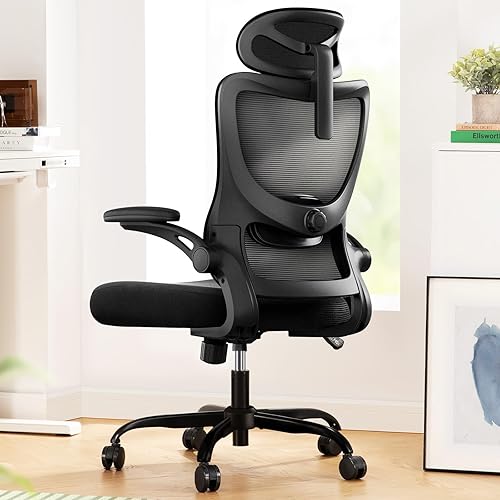 Best for adjustable lumbar fitMarsail Ergonomic Office Chair with High Back MeshView on Amazon
- 5
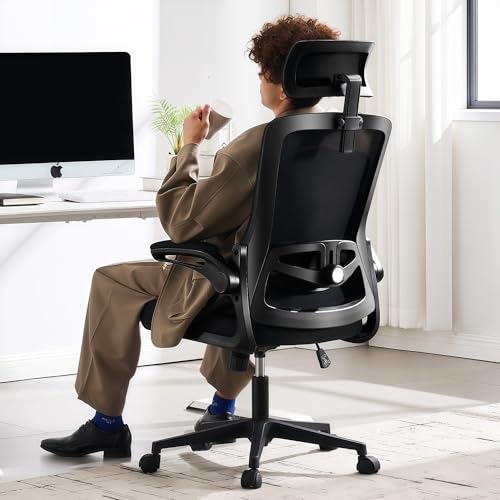 Best for padded comfortFizzin Office Chair Mesh Computer Chair with Adjustable Lumbar SupportView on Amazon
- 6
 Best for a leather executive feelGTPOFFICE Executive Office Chair with Lumbar SupportView on Amazon
Our Top Picks
Quick Comparison
| Product | Best for | Key feature |
|---|---|---|
| TRALT Office Chair Ergonomic Desk Chair | Everyday home office use | Lumbar support, flip-up arms |
| ELABEST X100 Ergonomic Mesh Office Chair | Big and tall users | 5D flip-up arms, footrest |
| CAPOT Ergonomic Mesh Office Chair | Long desk sessions | 3-level tilt, 3D headrest |
| Marsail Ergonomic Office Chair | Adjustable lumbar fit | Adjustable lumbar, 3D armrests |
| Fizzin Office Chair Mesh Computer Chair | Padded comfort | Thickened cushion, headrest |
| GTPOFFICE Executive Office Chair | Leather executive feel | Zoned pressure-relief cushion |
TRALT Office Chair Ergonomic Desk Chair with Lumbar Support
330 LBS Home Office Desk Chairs with Headrest, Reading Chair with Flip-up Armrests, Comfortable Computer Chairs (1, Black) TRALT Office Chair Ergonomic Desk Chair with Lumbar Support Black, 1
Best for: Everyday home office use with general lower back support.
A well-rounded option for people who sit at a desk most of the day and want lumbar support without a complicated setup.
Pros
- Built-in lumbar support with flip-up armrests
- Rated by the manufacturer for up to 330 lbs
Cons
- Lumbar pad is not independently adjustable in height
ELABEST X100 Ergonomic Mesh Office Chair with Footrest
ELABEST X100 Ergonomic Mesh Office Chair with Footrest, Big and Tall Hone Desk Chair with 5D Flip-Up Arms, Adjustable 3D Lumbar Support,Gaming & Executive Computer Chairs
Best for: Big and tall users who need a wider, sturdier seat.
Suited to larger frames that need a firm base and additional support for the legs and lower back.
Pros
- 5D flip-up armrests for varied arm positions
- Adjustable 3D lumbar support
Cons
- Larger footprint may not suit small rooms
CAPOT Ergonomic Mesh Office Chair, Adjustable Lumbar High Back
CAPOT Ergonomic Mesh Office Chair, Adjustable Lumbar High Back Desk Chair 400lbs, 4D Flip-up Arms, 3-Level Tilt Backrest, 3D Headrest, PU Wheels, Swivel Rolling Computer Chair for Long Desk Work
Best for: Long desk sessions where posture changes matter.
A good fit for people who lean back during calls or reading and want a tilt range to match.
Pros
- Three-level tilt backrest
- 3D headrest and high back for upper support
Cons
- Mesh back may feel firm until adjusted
Marsail Ergonomic Office Chair with High Back Mesh
Marsail Ergonomic Office Chair: Office Desk Chair with High Back Mesh and Adjustable Lumbar Support Rolling Work Swivel Task Chairs with Wheel 3D Armrests and Headrest
Best for: Adjustable lumbar fit for people who have specific support needs.
Works well for those who want to fine-tune the lower back support and armrest height rather than accept a fixed shape.
Pros
- Adjustable lumbar support
- 3D armrests and headrest
Cons
- Adjustment controls take a few minutes to learn
Fizzin Office Chair Mesh Computer Chair with Adjustable Lumbar Support
Fizzin Office Chair Mesh Computer Chairs with Adjustable Lumbar Support | Ergonomic Office Chair, Home Office Desk Chairs with Thickened Cushion and Headrest, Comfy Gaming Chair(Black)
Best for: Padded comfort during extended sitting.
Aimed at people who find thin seats uncomfortable after a few hours and want extra cushioning.
Pros
- Thickened seat cushion
- Adjustable lumbar support and headrest
Cons
- Thicker cushion can feel soft for some users
GTPOFFICE Executive Office Chair with Lumbar Support
GTPOFFICE Executive Office Chair with Comfortable Lumbar Support, Ergonomic Gaming Chair with Flip-up Armrests & Zoned Pressure-Relief Cushion, Comfy PU Leather Desk Chair, Black
Best for: A leather executive look with zoned pressure relief.
A fit for those who want a more formal appearance while still getting lumbar and seat support.
Pros
- Zoned pressure-relief cushion
- Flip-up armrests and PU leather finish
Cons
- PU leather can feel warmer than mesh in summer
Buying Guide
Lumbar Support Position
Good lumbar support should fill the natural curve of your lower back, usually around belt-line height. Check whether the support is fixed or adjustable, since fixed pads rarely suit every torso length. Worth reading next: Ergonomic Living Room Chair for Back Pain: 6 Best Picks Compared (2026).
Seat Depth and Height
Your thighs should be fully supported without the seat edge pressing into the back of your knees. Look for seat height that lets your feet rest flat with knees roughly level with the hips.
FAQ
Can an ergonomic office chair really help with back pain?
A well-designed ergonomic chair can reduce strain by supporting the natural curve of your lower back and letting you keep your hips and knees at comfortable angles. It is not a cure for every type of back pain, so persistent or severe pain should be evaluated by a healthcare professional. Think of the chair as one part of a broader approach that includes movement breaks and good desk setup.
How do I know if the lumbar support is positioned correctly?
The lumbar support should sit in the hollow of your lower back, roughly at the level of your belt line, without pushing you forward out of the seat. Adjustable lumbar models let you move the support up or down and change its firmness, which helps you find the spot that fits your frame. If you cannot adjust it, a chair with a fixed support at a moderate height is often the safer bet.
What seat depth should I look for?
You want a seat deep enough to support your thighs while leaving a gap of a few finger widths between the front edge and the back of your knees. A seat that is too deep forces you to slouch away from the backrest, which undermines lumbar support. Adjustable seat depth is a helpful feature if you share a chair or change body position often.
Is mesh or padded fabric better for back pain?
Mesh backrests tend to breathe well and conform gently to the body, which many people find comfortable during long sessions. Padded fabric or leather can feel more cushioned but may trap heat over time. Choose based on your comfort preference and whether you run warm, since the support structure matters more than the covering.
Do I need armrests, and should they be adjustable?
Armrests help take weight off your shoulders and upper back, but they should not force your shoulders up or spread your elbows. Flip-up or height-adjustable armrests let you move them out of the way when you pull up to a desk or want to sit closer. Set them so your forearms rest lightly with your elbows near your sides.
How should I set up the chair once I get it?
Start by adjusting seat height so your feet rest flat on the floor and your knees sit roughly level with or slightly below your hips. Next, set the lumbar support, then the backrest tilt so you can lean back slightly without losing contact with the lumbar area. Finish with armrest height and screen position so your neck stays relaxed and you are not reaching for your keyboard.
Conclusion
If you want an all-around chair with strong adjustability for everyday desk work, the TRALT model is a sensible starting point, while the ELABEST and CAPOT options suit people who want more fine-tuning in lumbar and armrest settings. Taller or heavier users should give extra weight to the big-and-tall and high-capacity models, and those who prefer a more padded, executive feel may lean toward the GTPOFFICE chair.
Whichever you choose, prioritize a chair you can adjust to your own body, and consider a short trial period or easy return policy so you can confirm it truly eases your discomfort before committing for the long term.
Related reading
- Best Ergonomic Office Chair Back Pain: A Practical Guide (2026)
- 5 Best Ergonomic Office Chair Cushions for Tailbone and Back Pain (2026)
- 3 Best Ergonomic Pillows for Office Chair Picks for Lower Back Pain (2026)
About Caleb Morgan
Caleb Morgan is part of our editorial team and reviews and edits our fitness at work guides, checking product details against manufacturer specifications and owner feedback.