
 By Lauren Holland
Updated November 2026
If you are looking at a urevo strol 2e 2 in 1 under desk treadmill, you probably want to walk during the workday without giving up your desk space or your focus. The choice comes down to a few practical questions: how much room you have under the desk, whether you want an incline, how much you care about noise, and whether you want to manage speed from a phone or a simple handheld controller. The three models below were selected by comparing published specifications, brand reputation and the patterns owners commonly describe in their feedback, not by hands-on trials.
Our top picks at a glance
- 1
 TOP CHOICEBest overallUREVO Strol 2E Pro Smart Walking Pad Treadmill with APPView on Amazon
- 2
 Best for adjustable desk setupsUREVO Foldable Treadmill with Adjustable Laptop DeskView on Amazon
- 3
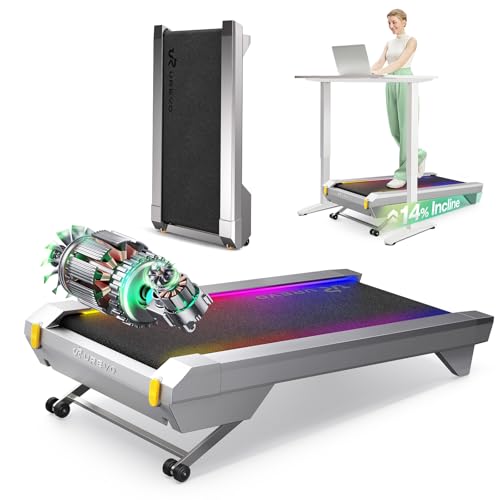 Best budget pickUREVO CyberPad Smart Walking Pad with 14% Auto InclineView on Amazon
Our Top Picks
Quick Comparison
| Product | Best for | Key feature |
|---|---|---|
| UREVO Strol 2E Pro Smart Walking Pad Treadmill with APP | Users who want app control and an incline | 12% incline with app-based speed control |
| UREVO Foldable Treadmill with Adjustable Laptop Desk | Standing and walking at the same desk | Height-adjustable laptop desk with 12% automatic incline |
| UREVO CyberPad Smart Walking Pad with 14% Auto Incline | Shoppers who want the steepest incline and a larger surface | 14% auto incline with brushless motor |
UREVO Strol 2E Pro Smart Walking Pad Treadmill with APP
UREVO Strol 2E Pro Smart Walking Pad Treadmill with APP, 12% Incline, Compact Walking Pad with Safety Handle, Plug & Play, Desk Treadmill with LED Display, Walking & Running for Home Office
Best for: Overall balance of incline, app control and compact footprint
This model suits people who want a walking pad they can control from a phone and who expect to use the incline feature regularly. It is also a reasonable fit for shared offices where a compact design matters.
Key specs
- 12% incline
- Smart app control
- Walking and light running use
- LED display
- Designed for home office placement
Pros
- Incline adds effort without raising speed
- App control keeps the handheld remote out of the way
- Compact enough for most under-desk spaces
Cons
- App features depend on a stable phone connection
- Not intended for running at high speeds
Bottom line: A strong first choice for someone who wants incline and app control in a compact walking pad.
View on AmazonUREVO Foldable Treadmill with Adjustable Laptop Desk
UREVO Foldable Treadmill with Adjustable Laptop Desk, 12% Auto Incline | Height-Adjustable Laptop Desk,12% Automatic Incline,Quiet Dual Brushless System,12-Point Shock Absorption
Best for: Standing and walking at the same desk
This option makes the most sense for people who alternate between sitting, standing and walking and want the laptop surface to move with them. It suits anyone who spends long stretches at a keyboard and wants a single setup for all three positions.
Key specs
- 12% automatic incline
- Height-adjustable laptop desk
- Foldable frame for storage
- Dual brushless system (per listing)
- 12-point shock absorption (per listing)
Pros
- Combines a walking pad and standing desk in one unit
- Shock absorption is listed to reduce impact on the frame
- Folds away when the desk is not in use
Cons
- Larger than a basic walking pad, so measure your space first
- Combined desk and treadmill setups take more assembly time
Bottom line: Best for people who want the walking pad and the desk surface to work as one system.
View on AmazonUREVO CyberPad Smart Walking Pad with 14% Auto Incline
UREVO CyberPad Smart Walking Pad with 14% Auto Incline, Brushless Motorized Under Desk Treadmill for Office Fitness, Elegant Speed Lights, Spacious Surface, Digital Controller, AI-Powered App,Silver
Best for: Users who want the steepest listed incline and a roomy walking surface
This model fits people who want more challenge from incline and a broader walking area. It is a good match for those who will walk for longer sessions and want a digital controller alongside app options.
Key specs
- 14% auto incline
- Brushless motor (per listing)
- Digital controller
- AI-powered app (per listing)
- Spacious walking surface
Pros
- Higher listed incline than the other two picks
- Digital controller and app give two ways to adjust settings
- Brushless motors are generally associated with quieter operation
Cons
- Wider surface may not fit narrow under-desk spaces
- Feature set adds setup steps for first-time users
Bottom line: Pick this one if you want the most incline and a larger surface and have the floor space to match.
View on AmazonBuying Guide
Measure Your Under-Desk Space
Measure the clearance from the underside of the desktop to the floor, then measure the depth and width you can spare. Many walking pads need several inches of clearance beyond the surface itself, so allow room for the handrail and cables. Measure the path between the desk and the wall as well, since a long pad may limit how close you can push your chair.
Good picks for this: UREVO Strol 2E Pro Smart Walking Pad Treadmill with APP, UREVO CyberPad Smart Walking Pad with 14% Auto Incline
Incline Range
Incline changes how hard each step feels. A 12% to 14% incline increases effort noticeably at low speeds. If you are new to walking at a desk, a moderate incline setting with a slow speed is a sensible way to start, and you can raise the speed gradually over several weeks.
Good picks for this: UREVO Foldable Treadmill with Adjustable Laptop Desk, UREVO CyberPad Smart Walking Pad with 14% Auto Incline
Control Method
Check whether the model uses a handheld remote, a digital controller, an app, or a combination. App control keeps the remote off your desk, but it depends on a phone connection. A physical controller works without a phone, which some users prefer for quick speed changes during calls.
Good picks for this: UREVO Strol 2E Pro Smart Walking Pad Treadmill with APP, UREVO CyberPad Smart Walking Pad with 14% Auto Incline
Noise and Motor Type
Motor noise matters if you take calls or share a room. Brushless motors are commonly described as quieter than brushed motors, though actual sound depends on speed, flooring and how the frame is placed. Placing a mat under the pad can reduce vibration noise on hard floors.
Good picks for this: UREVO Foldable Treadmill with Adjustable Laptop Desk, UREVO CyberPad Smart Walking Pad with 14% Auto Incline
Desk Integration
If you already use a standing desk, a model that pairs with a laptop surface may be simpler than a separate pad. If your desk is fixed, a standalone walking pad that slides under it is usually enough. Confirm that the walking surface clears your desk legs and drawers before buying. We also found 6 Best Deerrun Q1 Urban Mini Under-desk Treadmills with Remote Control (2026): Our Picks useful on this point.
Good picks for this: UREVO Foldable Treadmill with Adjustable Laptop Desk
Durability and Safety Features
Look for a handrail, an emergency stop method, and a frame that folds or stores easily. Check the manufacturer’s stated weight limit and make sure it covers your body weight with a margin. Inspect the belt and frame periodically for wear, and keep cables away from the moving belt.
Good picks for this: UREVO Strol 2E Pro Smart Walking Pad Treadmill with APP, UREVO Foldable Treadmill with Adjustable Laptop Desk
Care and Maintenance
Dust the belt and motor area regularly, and keep food and drinks away from the pad. Follow the manufacturer’s schedule for belt tension and lubrication if one is listed. Store the unit in a dry place, and unplug it when you are not using it.
Good picks for this: UREVO CyberPad Smart Walking Pad with 14% Auto Incline, UREVO Foldable Treadmill with Adjustable Laptop Desk
FAQ
Is a urevo strol 2e 2 in 1 under desk treadmill suitable for everyday office use?
Walking pads of this type are designed for low to moderate speeds during work tasks such as email, reading and phone calls. Keeping sessions moderate and paying attention to posture helps. Consult a healthcare professional before starting a new exercise routine, especially if you have joint, heart or balance concerns.
Do I need to attach the treadmill to the floor?
Most walking pads sit freely on the floor. Use a rubber or foam mat if you notice vibration on a hard surface. Check the manufacturer’s instructions for any specific placement guidance.
How do I start walking safely at a desk?
Begin at a slow speed with no incline, then increase gradually over several sessions. Hold the handrail when starting and stopping, and keep your gaze forward rather than down at your screen. Short sessions of 5 to 15 minutes are a common starting point.
Can I type while walking?
Many users find typing at very slow speeds manageable, but accuracy often drops at faster speeds. Start slow and adjust your desk height so your wrists stay neutral. A height-adjustable laptop surface can help with this.
How much clearance do I need under my desk?
Measure from the underside of the desktop to the floor and compare that figure with the pad’s listed height. Allow extra room for the handrail and your feet. Measurements in the product listing are the most reliable reference.
Does incline make the workout harder?
Yes. Incline increases the effort required per step, so you can work at a lower speed and still feel the workload. Raise the incline gradually, and reduce it if you notice discomfort in your knees, hips or lower back.
How should I choose between the three models?
Choose the Strol 2E Pro for balanced incline and app control, the Foldable model if you want a walking pad and laptop desk in one unit, and the CyberPad if you want the steepest listed incline and a larger surface.
Conclusion
For most desk workers looking at a urevo strol 2e 2 in 1 under desk treadmill, the choice depends on space, incline needs and how you prefer to control speed. The UREVO Strol 2E Pro suits app-based control in a compact footprint, the UREVO Foldable Treadmill with Adjustable Laptop Desk suits people who alternate between sitting and standing, and the UREVO CyberPad suits those who want the highest listed incline and a larger walking surface. Measure your space, check the weight limit, and start with short, slow sessions.
Sources
- Physical activity guidelines and recommendations for adults (cdc.gov)
- Consumer safety information on exercise equipment and home fitness products (cpsc.gov)
- Workplace ergonomics guidance for computer workstations (osha.gov)
Related reading
- Urevo Under Desk Treadmill Manual: Setup and Safe Use Steps
- Yosuda Under Desk Treadmill: Setup, Safety and Buying Steps
- Yagud Under Desk Treadmill: Setup, Safety and Use Guide (2026)
- Where to Buy Under Desk Treadmill Models: A Buyer's Guide
- Walkingpad Z1 Under Desk Treadmill: 4 Best Picks in 2026
- Walkingpad Z1 Folding Under Desk Treadmill: Setup and Use Guide
About Lauren Holland
Lauren Holland is part of our editorial team and reviews and edits our fitness at work guides, checking product details against manufacturer specifications and owner feedback.