By Caleb Morgan
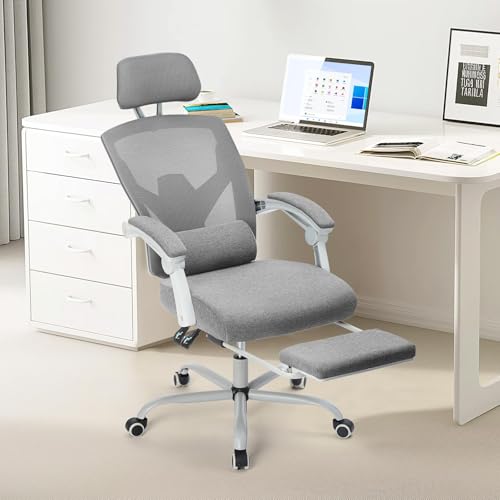
An ergonomic chair for tall people is one where the seat depth, seat height, backrest and armrests all match a body that runs longer than average. In this guide you will learn how to measure yourself, which chair specs to compare, how to test a chair before you commit, and how to adjust it so your hips, back and shoulders stay supported through a full workday. Most of the work comes down to checking a handful of numbers against your own dimensions.
Why standard office chairs often fail taller users
Most task chairs are built around a mid-range body size. When you are noticeably taller, the usual problems show up in predictable places. The seat pan ends before your knees, so the backs of your thighs press against the edge and cut circulation. The backrest hits your shoulder blades instead of your lower back. Your head may sit forward of the headrest, and your feet can dangle or rest on a pedestal base that does not reach the floor comfortably.
These mismatches push people into slumping, perching on the front edge, or reaching forward to type. Over weeks, that posture is what leads to neck tension and low back fatigue. A chair that fits your frame lets you sit back, keep your spine supported and keep your feet flat without effort.
Step 1: Measure your body before you shop
Before you compare chairs, take a few measurements. Use a tape measure and a helper if possible, and note the numbers in inches so you can compare them directly with manufacturer specs.
- Standing height: measure from the floor to the top of your head, barefoot and standing straight.
- Popliteal height: sit on a hard, flat chair with your feet flat on the floor. Measure from the floor to the crease behind your knee. This sets your ideal seat height.
- Buttock-to-popliteal length: measure from the back of your buttock to the back of your knee while seated. This tells you the seat depth you need so the front edge clears the back of your knee by about two to three fingers.
- Hip width: measure across the widest part of your seated hips. This helps you judge whether a seat pan will feel roomy enough.
- Shoulder height when seated: measure from the seat surface to the top of your shoulder. Use this to decide whether a backrest will reach your shoulder blades or sit too low or high.
Keep these numbers in a note on your phone. You will refer to them again when you read spec sheets and when you test a chair in person.
Step 2: Compare the specs that matter for tall users
Product listings vary in how much detail they give, but the following specs are the ones to check first. Manufacturers usually publish seat height range, seat depth, seat width, backrest height and armrest adjustment ranges.
| Spec | What to look for if you are tall | Why it matters |
|---|---|---|
| Seat height range | Lowest setting well below your popliteal height and a top setting that lets you raise the seat enough | Your feet should rest flat with thighs roughly parallel to the floor |
| Seat depth | Adjustable depth, or a deep pan that suits your buttock-to-popliteal length | Prevents pressure behind the knees and keeps your lower back against the backrest |
| Seat width | Enough width for your hip measurement with room to shift | Lets you change position without rubbing the armrests |
| Backrest height | A high backrest or an extension that reaches your upper back or shoulder blades | Supports the full length of your spine rather than only the lower back |
| Lumbar support | Adjustable height and depth, so it lands at the curve of your lower back | Your lumbar curve may sit higher or lower than average |
| Armrest adjustment | Height, width and pivot adjustments | Lets your shoulders stay relaxed while your forearms rest on the armrests |
| Base and casters | A wide base with stable casters, and enough clearance for your legs | Avoids tipping when you lean back and keeps your legs free of the base |
Step 3: Check seat depth and height first
Seat depth and height cause the most fit problems for taller people, so test them first. Sit with your back against the backrest, then slide forward slightly. Your spine should stay supported. Look for two to three finger widths between the front edge of the seat and the back of your knee. If the seat is too deep, you will feel pressure behind the knees; if it is too shallow, your thighs will be unsupported.
Next, set the seat height so your feet rest flat with knees at or slightly below hip level. If your feet cannot reach the floor, use a footrest. Many taller users find a footrest more useful than a higher desk, because raising the desk can push your shoulders up.
Sub-step: Use a footrest when the floor is out of reach
If the chair cannot go low enough for your legs to fit under the desk while your feet stay flat, a footrest closes the gap. Choose one with a non-slip surface and a tilt option so you can shift your foot position during the day.
Step 4: Set the backrest and lumbar support
Sit back fully so your buttocks touch the rear of the seat. Adjust the lumbar support so it presses gently into the curve of your lower back without pushing you forward. If the lumbar pad is fixed, check whether a separate lumbar cushion can fill the gap. Some people use a standalone pillow for this purpose; see our Best Lumbar Support Pillows for Office Chairs roundup for options.
For backrest height, you want the top of the backrest to cover your shoulder blades. Taller users sometimes find that a standard backrest only reaches the mid-back. A chair with a higher backrest or a tall-back option usually solves this. For broader guidance on choosing a model, our Top 7 Ergonomic Chairs with Lumbar Support Picks for Every Need article compares several designs.
Step 5: Adjust armrests and desk height together
Armrests should support your forearms without lifting your shoulders. As a starting point, set them so your elbows rest at roughly a 90-degree angle with shoulders relaxed. Armrests that are too low let your shoulders droop, and armrests that are too high lift them. Many taller users find that the armrests need to be set slightly wider apart so the elbows do not press inward.
Your desk and chair work as a pair. If you raise the chair for comfortable foot contact, check that the desk surface still sits about level with your elbows when your forearms are parallel to the floor. If the desk is too low, consider a desk riser or a taller desk. For a step-by-step adjustment routine, see How to Adjust an Office Chair.
Step 6: Test the chair before you commit
If you can, sit in the chair for at least 15 to 20 minutes while doing real work. Pay attention to pressure points behind your knees, numbness in your thighs, and whether you keep sliding forward. Check whether you can recline without the chair tipping or the backrest pushing your head forward. Try the chair with your shoes on, since shoe height changes your foot position.
If you buy online, look for a return window long enough to test the chair at home for a full week. Use that week to adjust settings daily and note any hot spots or fatigue.
Recommended gear
Several products can help a taller user dial in fit when the chair alone does not solve everything.
- Adjustable footrest: lets you keep your feet supported when the seat sits high enough to clear the desk. View on Amazon
- Standalone lumbar cushion: fills gaps when the chair’s built-in lumbar support sits too high or too low on your back. View on Amazon
- Desk riser: raises the work surface if your chair must sit high and your desk is too low. View on Amazon
- Chair mat: protects flooring and helps the casters roll smoothly on carpet. View on Amazon
Common mistakes
- Buying based on the chair’s maximum user height alone, without checking seat depth and backrest height.
- Leaving the armrests at default height, which often forces the shoulders into a raised position.
- Sitting on the front edge of the seat to reach the keyboard, which removes lumbar support.
- Ignoring footrest needs and letting the feet dangle, which increases pressure under the thighs.
- Setting the chair once and never adjusting it again after a change in shoes, desk height or work tasks.
Tips for a better daily setup
- Recheck your settings every week for the first month, since your body takes time to adapt to a new seat.
- Take a short movement break every 30 to 45 minutes. Simple moves such as standing, shifting your weight and gently rotating your upper back help offset long periods of sitting.
- If you have a seat height that suits your legs but a desk that is too low, use a monitor arm to raise the screen rather than lowering your posture.
- Keep your keyboard and mouse close enough that your elbows stay near your sides.
FAQ
How tall should a chair be for someone who is six feet or taller?
Height alone does not determine fit. Your popliteal height and buttock-to-popliteal length matter more. A tall person usually needs a seat that adjusts high enough for the desk and a seat depth deep enough to support the thighs.
What seat depth is best for tall people?
The best depth leaves about two to three finger widths between the front edge of the seat and the back of your knee while your back rests against the backrest. Adjustable seat depth is the most flexible option.
Do I need a chair with a high backrest?
If your shoulder blades sit above the top of a standard backrest, a high-back or extended-back chair will support your upper spine better. Otherwise, a mid-back chair may be fine.
Can a footrest replace a chair that does not go low enough?
A footrest helps when the chair is high enough for the desk but your feet cannot reach the floor. It does not fix problems with seat depth or backrest height, so check those separately.
Should I use a lumbar pillow with an ergonomic chair?
A lumbar pillow can help if the chair’s built-in support does not sit at the curve of your lower back. Position it so it supports the spine without pushing you forward off the backrest.
How do I know if the chair fits?
Check that your feet rest flat, your thighs are supported without pressure behind the knees, your back stays against the lumbar support, and your shoulders are relaxed. If any of these fail after adjustment, the chair may not suit your body.
Is an ergonomic chair enough to prevent back pain?
A well-fitting chair reduces strain but does not replace movement, breaks and exercise. If you have ongoing back or neck pain, consult a doctor or physical therapist for an individual assessment.
Conclusion
An ergonomic chair for tall people works when the seat depth, seat height, backrest and armrests match your measurements. Start by measuring your popliteal height and buttock-to-popliteal length, compare specs against those numbers, and test the chair before you commit. Add a footrest or lumbar cushion where needed, and recheck your setup regularly.
Related reading
Ready to choose one?
About Caleb Morgan
Caleb Morgan is part of our editorial team and reviews and edits our fitness at work guides, checking product details against manufacturer specifications and owner feedback.