By Caleb Morgan
Updated November 2026
A gaming chair vs ergonomic chair comparison comes down to one question: do you need a seat that looks like a racing bucket and suits short, reclined sessions, or one that is built around adjustable support for hours of upright desk work? For most people who sit at a desk all day, an ergonomic chair wins. Gamers who want bold styling and a moderate recline may be happy with a gaming chair, provided they check its adjustability first.
| Criterion | Gaming chair | Ergonomic office chair |
|---|---|---|
| Design intent | Styled for gaming, with bolstered sides and racing-inspired shapes | Built for long sitting periods at a desk |
| Lumbar support | Often a fixed or loosely adjustable pillow | Typically adjustable in height and depth, sometimes with built-in mechanisms |
| Seat depth and height range | Varies; many have a narrower range | Usually wide, with gas-lift height adjustment and seat-depth options on many models |
| Armrests | Often 2D or 3D, sometimes fixed | Commonly 4D, moving in height, width, depth and pivot |
| Recline | Strong recline, often to around 135–160 degrees | Tilt with lock options; many keep you more upright |
| Upholstery | Usually PU leather or faux leather | Mesh, fabric or leather, chosen for breathability |
| Best for | Short, relaxed sessions and gaming | Full workdays at a desk |
Lumbar Support: Which Chair Protects Your Lower Back Better?
Lumbar support is the single most important feature to compare in any gaming chair vs ergonomic chair decision. Your lower spine has a natural inward curve, and a good chair should keep that curve supported while you sit. Ergonomic chairs usually offer adjustable lumbar support, either as a height-adjustable backrest, a mechanical lumbar knob, or a built-in curved backrest that follows the spine. This lets you fit the support to your own back.
Gaming chairs often include a removable lumbar pillow. These help, but the position is generally fixed to the pillow’s placement, so if the pillow sits too high or too low for your body, you have limited options. Winner: ergonomic chair. If you do choose a gaming chair, look for one with a lumbar pillow you can slide up and down and remove if needed. Check that the pillow’s position matches where your lower back actually curves, not just where the manufacturer put it.
If you have a diagnosed back condition, consult a physician or physical therapist before choosing a chair. They can tell you what support level suits your situation.
Adjustability: Which Chair Fits More Body Types?
Adjustability decides whether a chair can fit you, or whether you have to fit yourself to it. Ergonomic office chairs are usually designed with a wide range of seat height, seat depth and armrest movement. Many use a gas-lift cylinder for height and a sliding seat pan for depth. Armrests are frequently 4D, which means they move up and down, in and out, pivot inward and outward, and slide forward and back.
Gaming chairs vary widely. Higher-end models add 3D or 4D armrests and a decent height range, but budget and mid-range models often have fixed or 2D arms and a more limited seat height range. A common problem is that a gaming chair’s seat sits too deep for shorter users, leaving the back of the knees pressed against the edge. The fix in an ergonomic chair is usually a seat-depth adjustment, which many gaming chairs lack.
Winner: ergonomic chair. A good test is whether you can set your elbows at roughly a right angle with your shoulders relaxed, your feet flat on the floor, and a gap of about two to three finger widths between the seat edge and the back of your knees. If a chair cannot reach those settings, it will not feel comfortable over a full workday. Ergonomic chairs are more likely to hit those numbers without compromise.
Recline and Posture: Which Position Suits Long Hours?
Gaming chairs are designed for reclined sitting. Many recline 135 to 160 degrees, which feels relaxed and works well for watching a screen or taking a break between matches. A deep recline can be comfortable for short periods, but sustained reclined sitting shifts weight onto the backrest and can make it harder to use your hands at a keyboard.
Ergonomic chairs tend to favor a more upright, slightly open posture, often around 100 to 120 degrees between the seat and back, and many include a tilt mechanism with a lock. The tilt lets you rock back gently while keeping the body supported, which helps reduce static posture. Some ergonomic models also offer a synchro tilt, where the seat and back move together at a set ratio.
Winner: ergonomic chair for desk work. Reclined gaming positions can be fine for short stretches, but office tasks usually involve typing and reaching, and an upright-to-slightly-reclined setup suits those better. If your work involves frequent calls with long breaks in between, a tilt-lock ergonomic chair gives you more choice of position.
Materials and Breathability: Which Chair Keeps You Cooler?
Most gaming chairs use PU leather or faux leather over foam. These look sharp and are easy to wipe clean, but they trap heat. During a long session, many users notice sweat build-up on the back and seat. Some gaming chairs use fabric covers, which breathe better but can be harder to clean.
Ergonomic office chairs commonly use breathable mesh for the backrest and seat, or fabric and leather options with better airflow. Mesh tends to stay cooler through a full day, though some people find it less cushioned at first. Leather ergonomic chairs exist, and they feel premium, but they still trap heat more than mesh does.
Winner: ergonomic chair with mesh, especially in warm rooms or for anyone who sits for many hours. For a more detailed look at how different ergonomic models handle fit and comfort, see Ergonomic Office Chair for Tall People: 7 Best Picks Compared (2026) or Ergonomic Office Chair Small: 7 Fit Factors for Compact Workspaces.
Build Quality and Durability: Which Chair Lasts Longer?
Durability depends more on the specific model than on the category. Still, there are patterns. Ergonomic chairs built for office use often have metal bases, reinforced frames and gas-lift cylinders rated for commercial use. Manufacturers commonly specify weight capacities, and heavier-duty models list higher limits. Check the stated maximum user weight and make sure the chair’s frame and base match your needs.
Gaming chairs may have thinner foam, plastic components and synthetic upholstery that can crack or peel with heavy use. Some are very well made, but many owners report that the cushioning compresses after a year or two of daily use. Look for high-density foam, metal rather than plastic at key stress points, and warranty terms that cover the mechanism and cylinder.
Winner: ergonomic chair, on average, although a well-built gaming chair from a reputable maker can last. Read the warranty and the spec sheet before buying either type.
Armrests: Which Chair Supports Your Arms Better?
Armrests matter for keyboard and mouse work because they take weight off the shoulders and help keep the elbows at a comfortable angle. In an ergonomic chair, look for armrests that adjust in height, and ideally in width and depth. Pad thickness and surface shape also count. Soft, overly thick pads can cause pressure on the forearm, while a firm, slightly contoured pad is often easier to rest on.
Gaming chair armrests often look bold and feature padded wings, but many are fixed or move only in height. If you type all day, a fixed armrest may sit too high or too low, forcing your shoulders up or your wrists to bend. If you use a gaming chair primarily for play, fixed armrests are less of a problem.
Winner: ergonomic chair for typing. Being able to set the armrest height so your forearms rest lightly while your shoulders stay down is one of the most practical benefits an ergonomic chair offers. For more on this, see Ergonomic Office Chair No Arms: 7 Best Picks for Every Need (2026) for a look at the other side of the armrest question.
Style and Ease of Use: Which Chair Looks and Feels Right?
Style is personal. Gaming chairs usually come in bold colors and sporty shapes, and many people find them fun in a gaming room or streaming setup. Ergonomic chairs are often more neutral in color and shape, which blends into offices and shared spaces. Neither style is wrong, but the look should match where the chair lives.
Ease of use also matters. Ergonomic chairs with clearly labeled controls for lumbar, tilt tension and armrest adjustment are quicker to set up. Some gaming chairs bury adjustments under the seat or behind the back, which makes changes less convenient.
Winner: depends on your setting. Gaming chairs win for visual fit in a gaming room. Ergonomic chairs win for an office or a shared workspace.
Which Should You Choose?
- Choose an ergonomic chair if you sit at a desk for most of the workday, type a lot, and want adjustable lumbar support, 4D armrests and a breathable seat.
- Choose an ergonomic chair if you share a room with others or work from a home office that also serves as a guest room.
- Choose a gaming chair if you game for long stretches, prefer a deeper recline and want a chair that matches a gaming setup visually.
- Choose a gaming chair if you are shorter or taller than average and find that the gaming chair’s seat height and depth range fits you well. Measure first.
- Choose a gaming chair if you sit in short sessions, not full workdays, and want a relaxed position for leisure time.
- Consider a compromise by choosing a gaming chair with adjustable lumbar, a seat-depth adjustment and 3D or 4D armrests if you want style without giving up key adjustments.
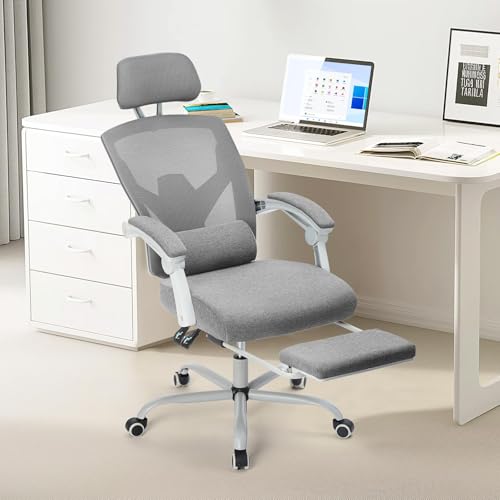
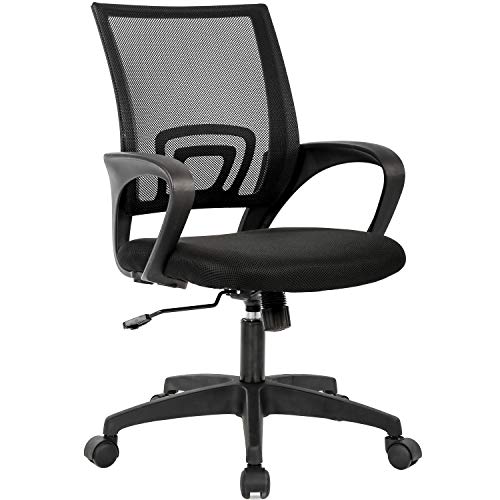
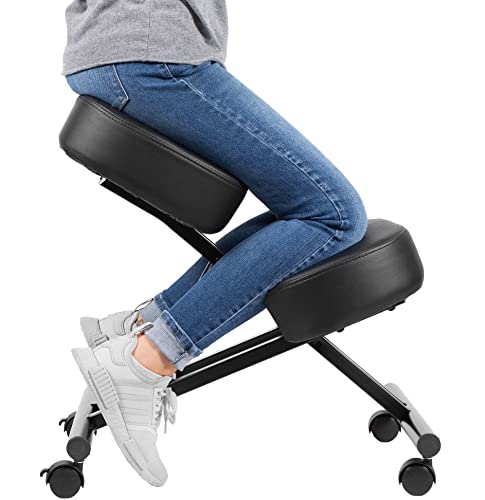
Here are example models to research. Check current specs before buying, because manufacturers update designs often.
View on Amazon View on AmazonCompare the lumbar, armrest and seat-depth specs on each product page against the checklist above rather than relying on the category label.
FAQ
Is a gaming chair bad for your back?
A gaming chair is not inherently bad for your back, but many have limited lumbar adjustment and fixed armrests. If you sit for long periods at a desk, an ergonomic chair with adjustable lumbar support is usually a better fit. Anyone with ongoing back pain should consult a physician or physical therapist.
Can you use a gaming chair as an office chair?
Yes, many people do. Make sure it has adjustable seat height, a seat depth that leaves a gap behind the knees, and armrests you can set at a comfortable height for typing. If it lacks lumbar adjustment, a separate lumbar cushion can help.
Are ergonomic chairs worth it compared to gaming chairs?
For full workdays, many people find the adjustability and breathability of ergonomic chairs more useful. For short gaming sessions, a gaming chair may be enough. Compare the adjustment features rather than the label.
What should I look for in a gaming chair if I want an office-friendly option?
Look for adjustable lumbar support, a seat-depth adjustment, 3D or 4D armrests, a wide height range and a breathable fabric or mesh back. Check the weight capacity and warranty too.
How do I test whether a chair fits me?
Sit with your feet flat on the floor, your thighs roughly parallel to the ground, and your elbows bent at about a right angle with shoulders relaxed. Leave a gap of two to three finger widths between the seat edge and the back of your knees. If the chair cannot reach those settings, it is unlikely to be comfortable over a full workday.
Conclusion
In the gaming chair vs ergonomic chair debate, the ergonomic chair is the better choice for most desk workers because of its adjustable lumbar support, 4D armrests and breathable materials. A gaming chair suits short, reclined sessions and a gaming room look. Measure your body, list the adjustments you need, and compare specs side by side before you buy.
About Caleb Morgan
Caleb Morgan is part of our editorial team and reviews and edits our fitness at work guides, checking product details against manufacturer specifications and owner feedback.