By Caleb Morgan
Updated November 2026
Neck and back pain often start with the chair. If you sit for six or more hours a day, a poorly matched seat can push your pelvis out of position, round your upper back and drop your head forward until your neck takes the strain. An ergonomic chair for neck and back pain works against those habits by holding your lower back in its natural curve, supporting your upper back and letting you adjust the seat, arms and headrest to your body. This guide compares seven chairs using the criteria that matter most for pain relief: lumbar support, headrest position, seat adjustability, backrest recline and build quality.
Our top picks at a glance
- 1
 TOP CHOICEBest overallCAPOT Ergonomic Mesh Office Chair, Adjustable Lumbar High Back Desk ChView on Amazon
- 2
 TOP CHOICEBest for small home officesTRALT Office Chair Ergonomic Desk Chair with Lumbar Support Black, 1 |View on Amazon
- 3
 TOP CHOICEBest for larger usersELABEST X100 Ergonomic Mesh Office Chair with Footrest, Big and Tall HView on Amazon
- 4
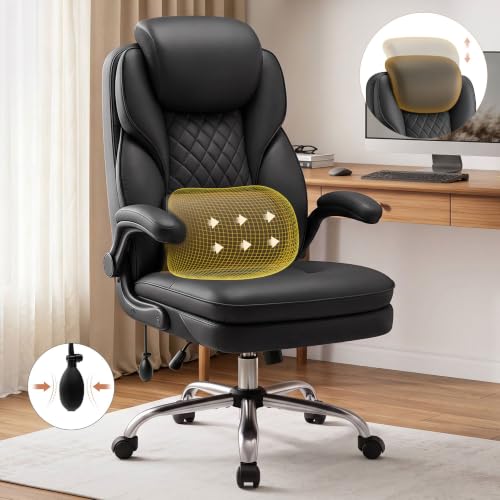 Best for lower back supportBestGlory Ergonomic Office Chair with Adjustable Lumbar Support & HeadView on Amazon
- 5
 Best for all-day comfortErgonomic Office Chair for Long Hours, 4-Way Lumbar, 330 lbs | All-DayView on Amazon
- 6
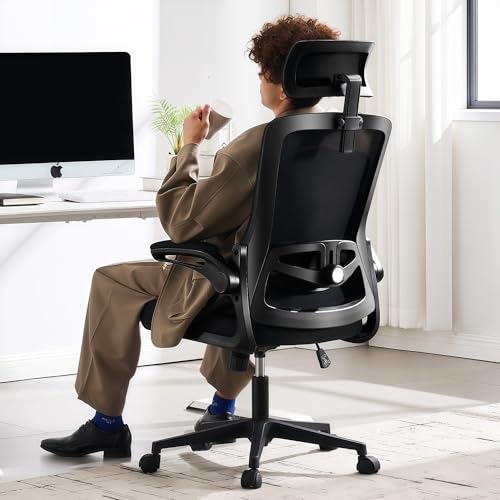 Best budget pickFizzin Office Chair Mesh Computer Chairs with Adjustable Lumbar SupporView on Amazon
- 7
 Best for adjustable lumbar on a tight budgetMarsail Ergonomic Office Chair: Office Desk Chair with High Back MeshView on Amazon
Our Top Picks
The table below summarizes the seven chairs. The detailed profiles follow, ordered by how well each one fits the selection criteria for people dealing with neck and back discomfort.
Quick Comparison
| Product | Best for | Key feature |
|---|---|---|
| CAPOT Ergonomic Mesh Office Chair | Overall neck and back support | Adjustable lumbar and 3D headrest |
| TRALT Office Chair Ergonomic Desk Chair | Small home offices | Lumbar support with headrest |
| ELABEST X100 Ergonomic Mesh Office Chair | Larger users | Footrest and 5D flip-up arms |
| BestGlory Ergonomic Office Chair | Lower back support | Adjustable lumbar with double seat cushion |
| Ergonomic Office Chair for Long Hours | All-day comfort | 4-way lumbar and 3.5-inch cushion |
| Fizzin Office Chair Mesh Computer Chairs | Budget-conscious buyers | Adjustable lumbar and thickened cushion |
| Marsail Ergonomic Office Chair | Adjustable lumbar on a tight budget | High mesh back with 3D armrests |
CAPOT Ergonomic Mesh Office Chair, Adjustable Lumbar High Back Desk Chair 400lbs, 4D Flip-up Arms, 3-Level Tilt Backrest, 3D Headrest, PU Wheels, Swivel Rolling Computer Chair for Long Desk Work
CAPOT Ergonomic Mesh Office Chair, Adjustable Lumbar High Back Desk Chair 400lbs, 4D Flip-up Arms, 3-Level Tilt Backrest, 3D Headrest, PU Wheels, Swivel Rolling Computer Chair for Long Desk Work
Best for: Overall neck and back support during long desk sessions
This chair suits people who want adjustable lumbar support and a headrest that can be positioned to reduce forward head posture. It works well for those who alternate between upright and reclined positions during the day.
Key specs
- Weight capacity: 400 lbs (as listed)
- Adjustable lumbar support
- 3D headrest
- 4D flip-up armrests
- 3-level tilt backrest
- PU wheels
Pros
- Adjustable lumbar support helps maintain the lower back curve
- 3D headrest can be positioned to support the neck
- Multiple recline positions allow posture changes
Cons
- Assembly takes some time and patience
- PU wheels may not suit all hard floor surfaces
Bottom line: A strong first choice for people who want the most adjustability for neck and back concerns.
View on AmazonTRALT Office Chair Ergonomic Desk Chair with Lumbar Support Black, 330 LBS Home Office Desk Chairs with Headrest, Reading Chair with Flip-up Armrests
TRALT Office Chair Ergonomic Desk Chair with Lumbar Support Black, 1 | 330 LBS Home Office Desk Chairs with Headrest, Reading Chair with Flip-up Armrests, Comfortable Computer Chairs (1, Black)
Best for: Small home offices and compact workspaces
This chair fits people who need lumbar support and a headrest without a bulky frame. It is a practical option for spare bedrooms or apartment offices.
Key specs
- Weight capacity: 330 lbs (as listed)
- Lumbar support
- Headrest
- Flip-up armrests
Pros
- Compact footprint suits small rooms
- Lumbar support addresses lower back fatigue
- Headrest adds neck support during reading or reclining
Cons
- Lower weight capacity than some heavy-duty models
- Fewer adjustment options than premium chairs
Bottom line: A sensible pick for home offices where space and a moderate budget both matter.
View on AmazonELABEST X100 Ergonomic Mesh Office Chair with Footrest, Big and Tall Hone Desk Chair with 5D Flip-Up Arms, Adjustable 3D Lumbar Support, Gaming & Executive Computer Chairs
ELABEST X100 Ergonomic Mesh Office Chair with Footrest, Big and Tall Hone Desk Chair with 5D Flip-Up Arms, Adjustable 3D Lumbar Support,Gaming & Executive Computer Chairs
Best for: Larger users who need a sturdy frame and lumbar adjustment
This chair is designed for users who need extra seat and frame strength. The footrest option can help reduce pressure on the lower back when the legs are extended.
Key specs
- Big and tall design
- Adjustable 3D lumbar support
- 5D flip-up armrests
- Footrest included
Pros
- Sturdy frame suits larger body types
- 3D lumbar adjustment supports varied postures
- Footrest supports leg positioning
Cons
- Larger footprint may not fit tight spaces
- Heavier to move across floors
Bottom line: Best suited to bigger users who want structural support and a footrest option.
View on AmazonBestGlory Ergonomic Office Chair with Adjustable Lumbar Support & Headrest | Executive Computer Desk Chair with Double Seat Cushion, Big and Tall Gaming Chair for Lower Back Pain Relief
BestGlory Ergonomic Office Chair with Adjustable Lumbar Support & Headrest | Executive Computer Desk Chair with Double Seat Cushion, Big and Tall Gaming Chair for Lower Back Pain Relief
Best for: Lower back support during extended seated work
This chair targets lower back discomfort with adjustable lumbar support and a double seat cushion. It suits people whose main complaint is pain low in the back after long sitting. You may also like 5 Best Cushions for Ergonomic Chair Picks for Tailbone and Back Pain (2026).
Key specs
- Adjustable lumbar support
- Headrest
- Double seat cushion
- Big and tall design
Pros
- Adjustable lumbar helps fit the curve of the lower back
- Double seat cushion adds padding for longer sessions
- Headrest supports neck positioning
Cons
- Cushion thickness may feel firm to some users at first
- Gaming styling may not suit every office
Bottom line: A focused choice for people whose primary issue is lower back pain.
View on AmazonErgonomic Office Chair for Long Hours, 4-Way Lumbar, 330 lbs | All-Day Comfort, 3.5″ Cushion, Breathable Mesh, Tilt & Rock, BIFMA-Tested, 5-Year Warranty, 90-Day Returns, 24/7 Support
Ergonomic Office Chair for Long Hours, 4-Way Lumbar, 330 lbs | All-Day Comfort, 3.5" Cushion, Breathable Mesh, Tilt & Rock, BIFMA-Tested, 5-Year Warranty, 90-Day Returns, 24/7 Support
Best for: All-day comfort for people who sit through full workdays
This chair is aimed at people who need steady comfort over long hours. The 4-way lumbar and tilt-and-rock mechanism give several ways to change position.
Key specs
- Weight capacity: 330 lbs (as listed)
- 4-way lumbar support
- 3.5-inch seat cushion
- Breathable mesh back
- Tilt and rock function
Pros
- Four-way lumbar adjusts height and depth
- Tilt and rock encourages position changes
- Breathable mesh keeps the back cooler
Cons
- Mesh may feel less supportive to users who prefer firm padding
- Assembly instructions may need careful reading
Bottom line: A strong fit for people who want several support adjustments for all-day sitting.
View on AmazonFizzin Office Chair Mesh Computer Chairs with Adjustable Lumbar Support | Ergonomic Office Chair, Home Office Desk Chairs with Thickened Cushion and Headrest, Comfy Gaming Chair (Black)
Fizzin Office Chair Mesh Computer Chairs with Adjustable Lumbar Support | Ergonomic Office Chair, Home Office Desk Chairs with Thickened Cushion and Headrest, Comfy Gaming Chair(Black)
Best for: Budget-conscious buyers who still want adjustable lumbar support
This chair offers the core features of an ergonomic chair for neck and back pain in a simpler package. It suits people setting up a first proper workstation.
Key specs
- Adjustable lumbar support
- Headrest
- Thickened seat cushion
- Mesh back
Pros
- Adjustable lumbar supports the lower back
- Thickened cushion adds seat comfort
- Headrest adds neck support
Cons
- Fewer advanced adjustments than premium models
- Padding may compress over long-term use
Bottom line: A practical starter choice for buyers who want the essentials without extra features.
View on AmazonMarsail Ergonomic Office Chair: Office Desk Chair with High Back Mesh and Adjustable Lumbar Support Rolling Work Swivel Task Chairs with Wheel 3D Armrests and Headrest
Marsail Ergonomic Office Chair: Office Desk Chair with High Back Mesh and Adjustable Lumbar Support Rolling Work Swivel Task Chairs with Wheel 3D Armrests and Headrest
Best for: Adjustable lumbar on a tight budget
This chair pairs a high mesh back with adjustable lumbar and 3D armrests. It fits people who want flexible arm and back positioning without a premium price.
Key specs
- High mesh back
- Adjustable lumbar support
- 3D armrests
- Headrest
- Swivel base with wheels
Pros
- 3D armrests help keep shoulders relaxed
- High back supports the full spine
- Adjustable lumbar fits varied body shapes
Cons
- Fabric and mesh may show wear with heavy daily use
- Limited recline range compared with higher-end chairs
Bottom line: A good value-focused choice for people who want flexible arms and lumbar support.
View on AmazonBuying Guide
Choosing an ergonomic chair for neck and back pain depends on a handful of measurable features. The factors below are the ones most worth checking before you buy.
Lumbar support
Lumbar support keeps the inward curve of the lower back. Look for adjustable height and depth, since a fixed pad rarely matches every torso length. Position the lumbar pad at the small of your back, roughly at belt level or slightly above.
Good picks for this: CAPOT Ergonomic Mesh Office Chair, BestGlory Ergonomic Office Chair
Headrest position
A headrest reduces strain on the neck when you recline. Check that it adjusts up and down and tilts forward or back. Ideally the headrest should contact the back of the skull or upper neck when you lean back.
Good picks for this: TRALT Office Chair Ergonomic Desk Chair, Fizzin Office Chair Mesh Computer Chairs
Seat height and depth
Your knees should sit at or slightly below hip height, with feet flat on the floor. Seat depth should leave about two to three finger widths between the seat edge and the back of your knees. Gas-lift cylinders typically allow a meaningful height range, so confirm the range in the manufacturer specifications.
Good picks for this: Ergonomic Office Chair for Long Hours, Marsail Ergonomic Office Chair
Armrest adjustability
Armrests should support the forearms with shoulders relaxed. Adjustable height, width and pivot help prevent shoulder tension that can travel up into the neck. Flip-up arms also make it easier to slide the chair under a desk.
Good picks for this: ELABEST X100 Ergonomic Mesh Office Chair, Marsail Ergonomic Office Chair
Size, weight capacity and fit
Check the stated weight capacity and seat width against your body. A chair rated well above your weight will generally feel more stable and hold its adjustments longer. Users who are taller or larger may need a model specifically designed for bigger frames.
Good picks for this: ELABEST X100 Ergonomic Mesh Office Chair, CAPOT Ergonomic Mesh Office Chair
Recline and tilt
A backrest that reclines slightly lets you shift weight off the spine during the day. Tilt lock and tension adjustment help keep the chair in the position you choose. Regular position changes are generally considered helpful for reducing static posture strain.
Good picks for this: Ergonomic Office Chair for Long Hours, CAPOT Ergonomic Mesh Office Chair
Durability and care
Mesh backs breathe well but can sag or show wear if the frame is weak. Check the warranty length and what it covers. Wipe mesh and fabric regularly and tighten bolts every few months, since loose hardware can cause wobble that affects posture.
Good picks for this: Ergonomic Office Chair for Long Hours, BestGlory Ergonomic Office Chair We also found Ergonomic Chair for Pregnancy: 5 Best Picks for Expectant Moms (2026) useful on this point.
FAQ
Can an ergonomic chair really relieve neck and back pain?
An ergonomic chair can reduce pain that comes from poor seated posture, but it is not a treatment for injuries or medical conditions. Pain that persists, radiates down the arms or legs, or comes with numbness should be evaluated by a doctor or physical therapist.
How do I set up an ergonomic chair for neck pain?
Start with the seat height so your feet rest flat and your knees sit at or just below hip level. Set the lumbar support to fill the curve of your lower back. Adjust the headrest so it supports the back of your head when you recline, and keep your screen at or just below eye level. A related read: 7 Best Ergonomic Chairs with Headrest for Long Workdays (2026).
Is a headrest necessary for neck pain?
A headrest is useful when you recline, because it supports the head and reduces strain on the neck. If you mostly sit upright and lean forward, a headrest matters less. Choose a chair where the headrest can be adjusted or removed.
How often should I change my sitting position?
Many ergonomic guidelines suggest changing position every 30 to 60 minutes and standing or stretching briefly. Using the recline function is one easy way to vary posture without leaving the desk.
What weight capacity should I look for?
Choose a chair rated above your body weight, with some margin. Check the manufacturer specifications rather than relying on general claims, and confirm the seat width fits your hips comfortably.
Are mesh chairs as supportive as padded chairs?
Mesh chairs offer breathability and contour, while padded chairs offer more cushioning. Support depends more on lumbar and seat adjustability than on material alone. Try to sit in both types if possible before deciding.
Should I see a professional about back or neck pain?
Yes, especially if pain lasts more than a few weeks or affects daily activity. A physician, physical therapist or occupational therapist can assess your posture and recommend an appropriate plan.
Conclusion
An ergonomic chair for neck and back pain should offer adjustable lumbar support, a headrest that positions well, and seat height and armrests you can tune to your body. The CAPOT Ergonomic Mesh Office Chair offers the broadest adjustment range among these seven. The ELABEST X100 suits larger users, while the BestGlory model focuses on lower back support. The TRALT chair works for smaller spaces, the Ergonomic Office Chair for Long Hours suits full workdays, and the Fizzin and Marsail models offer practical value for budget-conscious buyers. Match the chair to your body size, your main pain location and the amount of time you sit each day.
Sources
- Workplace ergonomics guidance covering seated posture and workstation setup (osha.gov)
- Information on prolonged sitting and the health effects of physical inactivity (cdc.gov)
- Industry standards for office seating and durability testing
Related reading
- Ergonomic Chair for Upper Back Pain: 6 Best Picks for Every Need (2026)
- Ergonomic Chair for Low Back Pain: 7 Best Picks Compared (2026)
- 5 Best Ergonomic Office Chair Cushions for Tailbone and Back Pain (2026)
About Caleb Morgan
Caleb Morgan is part of our editorial team and reviews and edits our fitness at work guides, checking product details against manufacturer specifications and owner feedback.