By Lauren Holland
Updated November 2026
A best standing desk conversion adds a raised work surface on top of your existing desk, so you can alternate between sitting and standing without buying new furniture. Done right, the converter sits at the correct height, keeps your monitor at eye level and leaves enough room for your keyboard and mouse. This guide walks through how to choose and set up one.
Step 1: Measure Your Desk and Your Body
Start by measuring the depth and width of your desk surface and the distance from the floor to your elbow when you sit upright. Your converter’s working surface should be placed so your elbows stay near 90 degrees while typing. Note the desk depth too, since many converters need roughly the same depth as your existing desk to avoid overhang.
Shopping for one? See our guide: 6 Best Standing Desk for Home Office (2026): Expert Picks.
Step 2: Choose the Right Converter Type
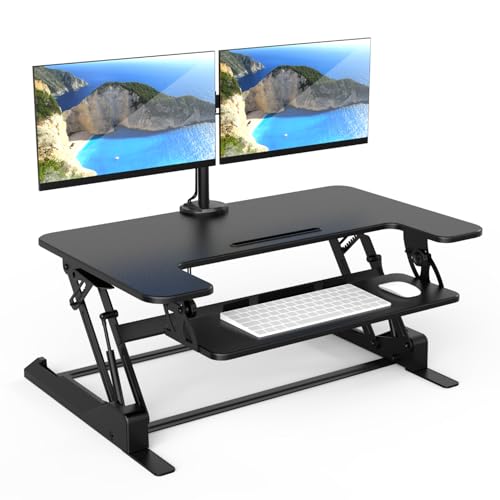
Most conversions fall into two groups. Single-tier converters sit on one surface and work well for a monitor, keyboard and mouse. Two-tier designs add a lower shelf for the keyboard so the monitor can rise higher, which suits people with larger monitors or multiple screens. For a fuller comparison of options, see our guide to Best Standing Desk Converters.
Step 3: Set the Height and Check Your Posture
Once the converter is in place, stand upright with your arms relaxed at your sides. Your keyboard should sit just below elbow height, and the top of your monitor should be at or slightly below eye level. Look straight ahead and check that your neck is not tilting down. Adjust the monitor height separately if your converter does not offer a separate tier.
- Keyboard surface: about 0 to 2 inches below standing elbow height
- Monitor top edge: roughly level with your eyes or a little lower
- Screen distance: about an arm’s length away
Step 4: Plan Your Standing and Sitting Routine
A converter works best when you use it in short, regular intervals rather than standing all day. Many people start with 20 to 30 minutes standing per hour and build up slowly. Keep your chair nearby for sitting periods, and consider an anti-fatigue surface if you stand on hard floors. Pairing your setup with a few movement breaks helps as well. Our list of Best Exercises for Standing Desk Users: 10 Moves for Work Days covers simple moves you can do between tasks.
Tools You Will Need
- A tape measure
- An adjustable monitor arm or stand, if your converter lacks a second tier
- A cable tray or clips to keep cords out of the way when the surface moves
- A cushioned mat for standing comfort
Common Mistakes to Avoid
- Choosing a converter wider or deeper than your desk, which can cause tipping or cramped work space
- Leaving the monitor at desk level, which pushes your head forward and strains the neck
- Standing for hours on the first day instead of building up gradually
- Forgetting to check cable length, so cords pull tight when the surface rises
- Placing the keyboard too high, which lifts the shoulders and tires the forearms
Recommended Gear
- Adjustable monitor arm: lets you raise the screen independently of the keyboard surface. View on Amazon
- Anti-fatigue standing mat: cushions your feet and encourages small weight shifts while standing. View on Amazon
- Cable management tray: keeps cords organized so the converter moves freely. View on Amazon
FAQ
Do I need to replace my desk to use a standing desk conversion?
No. A converter sits on top of your existing desk, so you keep your current furniture. Just confirm the surface is stable and large enough for the converter’s footprint.
How high should a converter go for a tall person?
Check the maximum height range in the manufacturer’s specifications and compare it with your standing elbow height. If your monitor needs to rise higher than the converter allows, a separate monitor arm can help.
Is standing all day healthy?
Standing for long periods can cause discomfort in the legs and lower back. Alternating between sitting and standing is generally recommended, and if you have a medical condition, consult a doctor or physical therapist before changing your work routine. For another angle, check out Adjustable Standing Desk Conversion: A Practical Guide (2026).
Conclusion
A well-chosen converter lets you stand without replacing your desk. Measure carefully, set your keyboard and monitor heights, and build up standing time gradually. With a sound setup, your workday can include more movement and less strain.
Related reading
Ready to choose one?
About Lauren Holland
Lauren Holland is part of our editorial team and reviews and edits our fitness at work guides, checking product details against manufacturer specifications and owner feedback.