By Lauren Holland
Updated November 2026
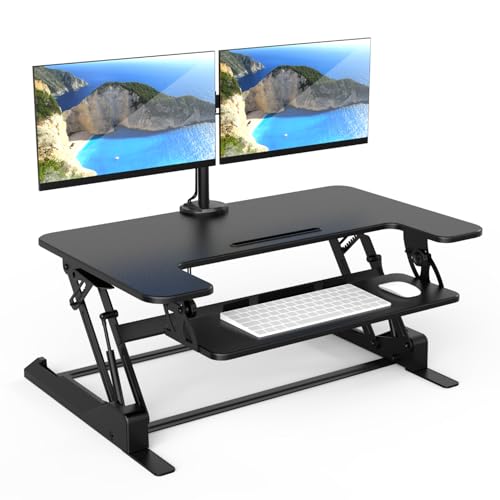
A dual screen standing desk setup lets you alternate between sitting and standing while keeping both monitors at eye level. Done right, it reduces neck and shoulder strain and keeps you moving through the workday. This guide walks through the measurements and layout choices that make the difference.
Step 1: Check Desk Width and Depth First
Two monitors side by side usually need a desk at least 60 inches wide, though 72 inches or more gives you room for a keyboard, mouse and notebook. Depth matters just as much. Aim for at least 28 inches so the screens can sit about 20 to 30 inches from your eyes without crowding the front edge.
Shopping for one? See our guide: 6 Best Standing Desk for Home Office (2026): Expert Picks.
Step 2: Position Both Screens at Eye Level
The top edge of each monitor should sit at or just below eye level when you are standing. Your gaze should fall slightly downward, roughly 15 to 20 degrees below horizontal. If you use a single monitor arm or two separate arms, adjust them so both screens share the same height. Mismatched heights are a common cause of one-sided neck pain.
Step 3: Angle the Screens Toward Your Seated and Standing Positions
Because your eye level changes between sitting and standing, the monitors need to work in both positions. Set the height for standing first, then sit down and check. If you have to tilt your head up or down noticeably, lower the arms by a small amount. Many people find a compromise point that feels natural in both postures.
Angling the Screens
Turn each monitor inward so the screens form a shallow V, with the nearer edges about 12 to 18 inches apart at your sightline. This keeps the outer edges from pulling your head sideways.
Step 4: Arrange Keyboard, Mouse and Arm Space
Keep your keyboard and mouse at elbow height, with your elbows bent between 90 and 110 degrees. Leave enough room that you can move your mouse without bumping a monitor base. A deeper desk helps here, since the mouse often ends up farther out than people expect.
- Measure desk width and depth before buying anything.
- Set both monitors to the same height, top edge at or just below eye level.
- Angle the screens inward to form a shallow V.
- Check the setup while both standing and sitting.
- Place keyboard and mouse at elbow height.
- Recheck after a week and fine-tune.
Recommended Gear
A dual monitor arm frees up desk space and makes height adjustments simple. View on Amazon
A standing desk converter can work if you already have a sturdy desk, though its surface depth is often limited. View on Amazon
An anti-fatigue mat reduces discomfort when you stand for long stretches. View on Amazon
Common Mistakes
- Setting monitors for standing height only and ignoring the seated view.
- Placing screens too far apart, which forces repeated head turns.
- Letting one monitor sit higher than the other.
- Leaving the keyboard too far forward, which pushes your shoulders up.
- Skipping regular position changes, even with an adjustable desk.
FAQ
How far apart should two monitors be on a standing desk?
Keep the nearest edges about 12 to 18 inches apart at your sightline. This lets you see both screens with minimal head movement.
Should dual monitors be the same size?
Matching sizes and resolutions make it easier to keep windows consistent and eyes comfortable. It is not strictly required, but mismatched screens often cause small alignment issues.
Is a monitor arm better than a stand for a dual screen desk?
Arms usually offer more height and angle adjustment and free up desk space. Check weight limits for your monitors and consult the manufacturer’s specifications before buying.
Conclusion
A dual screen standing desk works best when both monitors sit at matching heights, angled inward, and set for both sitting and standing. Measure your desk, adjust the screens and recheck after a week. Small changes in height often make the biggest difference in comfort.
Related reading
- Yoga at Desk Exercises: 10 Seated and Standing Moves for Work
- Standing Workstation for Desk: A Step-by-Step Setup Guide
- Standing Desk for Treadmill: Setup, Safety and Buying Steps
- Standing Desk Leg Exercises: 7 Moves to Keep Legs Active at Work
- Standing Desk Glute Exercises: 7 Moves to Wake Up Your Hips at Work
Ready to choose one?
About Lauren Holland
Lauren Holland is part of our editorial team and reviews and edits our fitness at work guides, checking product details against manufacturer specifications and owner feedback.