
 By Caleb Morgan
Updated November 2026
If you spend hours at a screen and feel your neck creeping forward, an ergonomic chair for forward head posture can help more than you might expect. The chair will not fix the problem alone, but the right headrest position, lumbar support and armrest height can keep your head stacked over your shoulders for longer. This list focuses on chairs with an adjustable headrest, a lumbar support you can move up and down, and armrests that adjust in several directions. We also looked at the mesh or padded back, the recline range, the weight rating and how owners describe the chair after daily use. All picks come from research into specifications, brand reputation and patterns in owner feedback. We did not test these chairs ourselves.
Best overall: HOLLUDLE Ergonomic Mesh Office Chair – View on Amazon
Best for recline and neck support: GABRYLLY Ergonomic Office Chair with Footrest – View on Amazon
Best for a footrest and wide recline range: Ergonomic Office Chair with footrest, 90-160° Recline – View on Amazon
Best for flip-up arms: DUMOS Ergonomic Office Chair – View on Amazon
Best budget pick (add-on headrest): Office Chair Headrest Attachment Universal – View on Amazon
Best for heavy users: Ergonomic Office Chair 330 lb with Wheels – View on Amazon
Our Top Picks
Quick Comparison
| Product | Best for | Key feature |
|---|---|---|
| HOLLUDLE Ergonomic Mesh Office Chair | Balanced all-round support | 2D headrest and 3D lumbar support |
| GABRYLLY Ergonomic Office Chair with Footrest | Reclining while keeping the head supported | 135° recline with headrest |
| Ergonomic Office Chair with footrest, 90-160° Recline | Users who want a deep recline | 90–160° recline and footrest |
| DUMOS Ergonomic Office Chair | Flip-up arms and tight spaces | Flip-up arms and headrest |
| Office Chair Headrest Attachment Universal | Adding head support to a chair you own | Adjustable height and angle |
| Ergonomic Office Chair 330 lb with Wheels | Larger or heavier users | 330 lb capacity and 2D headrest |
HOLLUDLE Ergonomic Mesh Office Chair, V Back Desk Chair with 2D Headrest

HOLLUDLE Ergonomic Mesh Office Chair, V Back Desk Chair with 2D Headrest | 3D Adjustable Lumbar Support, 350lbs Capacity with 3D Armrests, 3-Level Tilt Lock for Home Office Use – White
Best for: Balanced all-round support for forward head posture
This chair suits people who want a headrest they can angle forward and back, plus a lumbar support that sits at the right height for the lower back. It is a practical choice for a home office where you sit for long stretches.
Key specs
- Mesh back with a V-shaped design
- 2D headrest
- 3D adjustable lumbar support
- 3D armrests
- 350 lb capacity, as stated in the listing
- 3-level tilt lock
Pros
- The 2D headrest can be set so your head rests without pushing it forward
- Mesh keeps the back cooler during long sessions
- The 3D armrests help keep shoulders relaxed
Cons
- Mesh can feel firm to people who prefer thick padding
- Assembly takes some time and needs a second person for lifting
Bottom line: A strong first choice for someone who wants adjustable head and lumbar support without paying for a premium brand.
View on AmazonGABRYLLY Ergonomic Office Chair with Footrest, 135° Reclining Desk Chair

GABRYLLY Ergonomic Office Chair with Footrest, 135° Reclining Desk Chair with Adjustable Lumbar Support,3D Armrest,Headrest & Large Steel Base, 300LBS Heavy Duty Mesh Chair
Best for: Reclining while keeping the head supported
This is a good fit if you alternate between upright work and leaning back to read or take calls. The headrest and recline together help you rest your head in a neutral position instead of letting it drop forward.
Key specs
- 135° recline
- Adjustable lumbar support
- 3D armrests
- Headrest
- Large steel base
- 300 lb capacity, as stated in the listing
Pros
- Recline range helps shift load off the neck when you need a break
- Headrest and lumbar support work together
- Steel base adds stability
Cons
- Deep recline can make it harder to reach a desk without adjusting height
- Some owners find the headrest position needs fine-tuning
Bottom line: Best for someone who splits time between desk work and relaxed reclining and wants a headrest for both positions.
View on AmazonErgonomic Office Chair with footrest, 90-160° Recline Computer Desk Chair

Ergonomic Office Chair with footrest, 90-160° Recline Computer Desk Chair | Adjustable Lumbar Support & Headrest & Foot Rest, High-Back Breathable Mesh, 360° Rolling Swivel chair, Comfy Arm for Home
Best for: Users who want a deep recline and a footrest
The footrest and wide recline suit people who want to lift their feet and lean back, which can take pressure off the neck and lower back during long calls or reading.
Key specs
- 90–160° recline
- Adjustable lumbar support
- Headrest
- Foot rest
- High-back breathable mesh
- 360° rolling swivel base
Pros
- Wide recline gives more ways to change posture during the day
- Footrest supports circulation when reclined
- Breathable mesh back
Cons
- The footrest adds bulk that may not suit small rooms
- Recline mechanisms need checking for smooth operation over time
Bottom line: Ideal for someone who wants the most range of motion and is comfortable with a larger chair.
View on AmazonDUMOS Ergonomic Office Chair, Desk Computer Chair, Lumbar Support
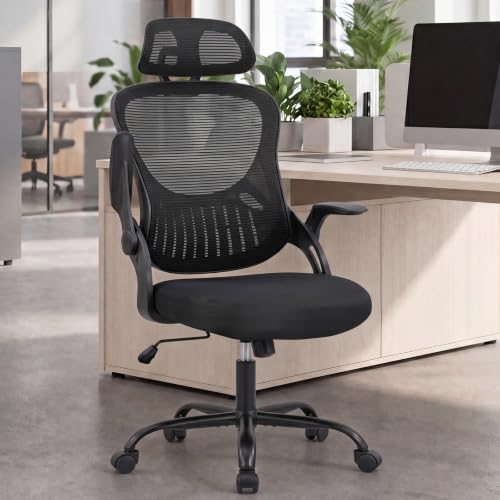
DUMOS Ergonomic Office Chair, Desk Computer Chair, Lumbar Support | High Back Mesh, Headrest Flip-up Arms, Swivel Wheels, Gaming Desk Chair, Home Bedroom, Black
Best for: Flip-up arms and tight spaces
Flip-up arms let you slide the chair closer to a desk or table, which helps you keep your head and shoulders aligned with your screen instead of reaching forward.
Key specs
- High mesh back
- Lumbar support
- Headrest
- Flip-up arms
- Swivel wheels
Pros
- Flip-up arms make it easier to get close to the desk
- Headrest included
- Works in bedrooms and home offices
Cons
- Fixed-style arms may not suit people who need full arm adjustment
- Owners often mention the seat may need a cushion for long use
Bottom line: A practical pick for small rooms where you need to sit close to the work surface.
View on AmazonOffice Chair Headrest Attachment Universal, Head Support Cushion
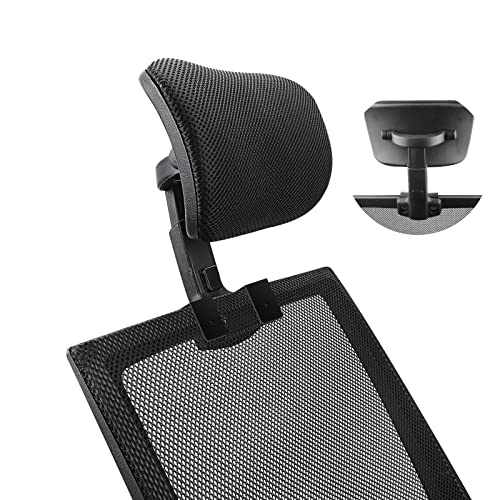
Office Chair Headrest Attachment Universal, Head Support Cushion for Any Desk Chair, Elastic Sponge Head Pillow for Ergonomic Executive Chair, Adjustable Height & Angle Upholstered, Chair Not Included
Best for: Adding head support to a chair you already own
If your current chair has a good back but no headrest, this universal attachment can add neck support. It is a low-cost way to test whether head support changes your posture before buying a full new chair.
Key specs
- Universal fit for most desk chairs
- Adjustable height and angle
- Elastic sponge cushion
- Chair not included
Pros
- Works with many chairs
- Easy to move up or down to match your neck
- Simple way to add support without replacing furniture
Cons
- Attachments can slip on smooth or thin chair backs
- Cushion firmness varies from owner to owner
Bottom line: A sensible add-on for someone whose chair is otherwise comfortable but lacks a headrest.
View on AmazonErgonomic Office Chair 330 lb with Wheels, Lumbar Support & Headrest

Ergonomic Office Chair 330 lb with Wheels, Lumbar Support & Headrest | Flip-Up Arms,Back Support,Gaming chairs,Breathable Mesh,2D Headrest
Best for: Larger or heavier users who need a stable frame
The 330 lb rating and sturdy frame suit people who want a chair that holds its shape under load. The 2D headrest and flip-up arms help keep the head and shoulders in a supported position.
Key specs
- 330 lb weight rating, as stated in the listing
- Lumbar support
- 2D headrest
- Flip-up arms
- Breathable mesh
- Wheels
Pros
- High weight rating for a wide range of users
- 2D headrest adjusts in two directions
- Flip-up arms give flexible desk positioning
Cons
- Heavier build can make it harder to move across hard floors
- Mesh may feel less cushioned than foam-padded chairs
Bottom line: Best for a user who needs a high weight rating and wants a full set of adjustable support points.
View on AmazonBuying Guide
Headrest adjustability
For forward head posture, the headrest should support the base of your skull when you sit upright, not push your head forward. Look for a headrest that moves up and down and, ideally, tilts or slides so you can position it without bending your neck. A 2D or 3D headrest gives more adjustment than a fixed pad.
Good picks for this: HOLLUDLE Ergonomic Mesh Office Chair, Ergonomic Office Chair 330 lb with Wheels
Lumbar support height and depth
A lumbar support that sits in the small of the back helps keep the pelvis in a neutral position, which in turn helps the upper spine stay upright. Check whether the support adjusts up and down and in or out. If it is fixed, make sure it lines up with your lower back at a seated height.
Good picks for this: HOLLUDLE Ergonomic Mesh Office Chair, DUMOS Ergonomic Office Chair
Recline range and tilt lock
A recline that opens up to a wide angle lets you change position during the day. A tilt lock lets you hold the chair at a set angle so it does not drift back when you lean forward. For posture, aim for a range that lets you rest your head against the headrest without straining.
Good picks for this: GABRYLLY Ergonomic Office Chair with Footrest, Ergonomic Office Chair with footrest 90-160° Recline
Armrest adjustment
Armrests should let your shoulders drop and your elbows rest at roughly a right angle. Adjustable armrests that move in height, width and depth are the most flexible. Flip-up arms help when you need to slide the chair under a desk.
Good picks for this: DUMOS Ergonomic Office Chair, HOLLUDLE Ergonomic Mesh Office Chair
Weight rating and build
Check the stated weight capacity and the frame material. A higher rating usually means a sturdier base and mechanisms, which keeps the chair stable and the headrest in place. Make sure the rating matches your body weight with a margin.
Good picks for this: Ergonomic Office Chair 330 lb with Wheels, GABRYLLY Ergonomic Office Chair with Footrest
Seat depth and chair height
Your feet should rest flat on the floor with the seat front a few finger-widths short of the back of your knees. If the chair is too high, your head may tilt forward to see the screen. Set the screen so the top third of the display sits at or slightly below eye level.
Good picks for this: Ergonomic Office Chair with footrest 90-160° Recline, DUMOS Ergonomic Office Chair
Care and durability
Mesh backs are easy to wipe clean and tend to stay cool, but the mesh can sag over time. Foam cushions can flatten. Check fasteners and recline mechanisms every few months and tighten anything that feels loose. Owners commonly report that a headrest attachment needs re-seating after being moved.
Good picks for this: HOLLUDLE Ergonomic Mesh Office Chair, Office Chair Headrest Attachment Universal
FAQ
Can an ergonomic chair fix forward head posture on its own?
A chair can support better posture, but it works best alongside regular movement, screen height adjustments and short breaks. If neck pain persists, consult a physical therapist or doctor.
Where should the headrest sit?
Aim for the headrest to touch the back of your head or the base of your skull when you sit upright. It should support your head rather than push it forward.
Is a headrest attachment as good as a built-in headrest?
A good attachment can add support, but built-in headrests are usually more secure and easier to position. Attachments depend on how well they grip the chair back.
How high should the lumbar support be?
The lumbar support should sit in the curve of your lower back, usually a few inches above the seat. Adjust it so you feel light, even contact without being pushed forward.
Do I need a footrest for good posture?
A footrest is helpful when a chair reclines a lot, because it keeps your legs supported. If your feet already sit flat on the floor, you may not need one.
How often should I readjust my chair?
Check your setup at the start of each workday and again after any major change in your desk or screen. Small adjustments often make a bigger difference than large ones.
Conclusion
For most people with forward head posture, the HOLLUDLE Ergonomic Mesh Office Chair offers a balanced mix of headrest and lumbar adjustment. Choose the GABRYLLY or the 90–160° recline chair if you want to alternate between upright work and reclining. The DUMOS chair suits small spaces with flip-up arms, the universal headrest attachment helps if your current chair lacks head support, and the 330 lb chair suits larger users who need a sturdy frame. Set the headrest, lumbar and armrests before you start work each day.
Sources
- Workstation setup guidance and computer workstation ergonomics (osha.gov)
- Information on preventing neck and back strain during desk work (cdc.gov)
- Research on neck posture and musculoskeletal health (nih.gov)
Related reading
- Ergonomic Office Chair No Wheels: 5 Best Picks for Stable Posture (2026)
- Ergonomic Kneeling Stool Chair: 6 Best Picks for Posture and Comfort (2026)
- Ergonomic Chair with Ball: 5 Best Picks for Posture and Comfort (2026)
- Ergonomic Chair for Reading: 5 Best Picks for Comfort and Posture
About Caleb Morgan
Caleb Morgan is part of our editorial team and reviews and edits our fitness at work guides, checking product details against manufacturer specifications and owner feedback.
