
 By Caleb Morgan
Updated November 2026
Shopping for a high end ergonomic gaming chair means balancing lumbar support, adjustable recline, footrest design, seat width and frame strength. Long sessions at a desk put steady pressure on the lower back and hips, so the right chair should hold a neutral posture without forcing you to sit rigid. The picks below are ranked by how well they match those criteria, based on manufacturer specifications and patterns in owner feedback rather than any hands-on testing.
Best overall: N-GEN GAMING Big & Tall Gaming Chair – View on Amazon
Best for wide frames: GTPLAYER Big and Tall Gaming Chair – View on Amazon
Best for built-in footrest: Respawn 110 Pro Ergonomic Gaming Chair – View on Amazon
Best for headrest comfort: Video Gaming Chair for Adults with Footrest – View on Amazon
Best for PU leather upholstery: N-GEN GAMING Gaming Chair with Footrest – View on Amazon
Best for soft fabric seating: GTPLAYER Big and Tall Office Chair – View on Amazon
Best for adjustable armrests: Large Ergonomic Gaming Chair, Black PU Leather – View on Amazon
Our Top Picks
Quick Comparison
| Product | Best for | Key feature |
|---|---|---|
| N-GEN GAMING Big & Tall Gaming Chair | Overall fit | Padded wide seat |
| GTPLAYER Big and Tall Gaming Chair | Wide frames | Pocket spring lumbar |
| Respawn 110 Pro Ergonomic Gaming Chair | Built-in footrest | 155° recline range |
| Video Gaming Chair for Adults with Footrest | Headrest comfort | 21-inch wide seat |
| N-GEN GAMING Gaming Chair with Footrest | PU leather upholstery | Linkage armrests |
| GTPLAYER Big and Tall Office Chair | Soft fabric seating | Velvet cushioned seat |
| Large Ergonomic Gaming Chair | Adjustable armrests | 4D armrests |
N-GEN GAMING Big & Tall Gaming Chair

N-GEN GAMING Big & Tall Gaming Chair, Footrest, Lumbar Support, Dark Black | Ergonomic High-Back Chair for Adults, Padded Wide Seat with Heavy-Duty Base, Reclining Comfort for Computer, Office/Home Us
Best for: Overall fit for larger frames who want a footrest and reclining back in one chair.
This high-back model pairs a padded wide seat with a heavy-duty base, which suits users who need more room than standard gaming chairs provide.
- Padded wide seat with footrest
- Heavy-duty base and reclining back
- Arm height may feel limited for some users
GTPLAYER Big and Tall Gaming Chair

GTPLAYER Big and Tall Gaming Chair 400lbs Heavy Duty Office Chair with Footrest, High Back Pocket Spring Lumbar Support, Ergonomic Wide Comfy Seated Cushion for Lower Back Pain Relief, Carbon-Black
Best for: Wide frames and users who want pocket spring lumbar support. We also found DUMOS Ergonomic Computer Gaming Chair: 5 Best Picks Compared (2026) useful on this point.
Owners often describe it as a sturdy option for long sessions, with a seat cushion designed to ease pressure on the lower back.
- Pocket spring lumbar support
- Wide seat with heavy-duty construction
- Bulky footprint for smaller rooms
Respawn 110 Pro Ergonomic Gaming Chair

Respawn 110 Pro Ergonomic Gaming Chair with Footrest and Recline | Ergonomic office chair comfort with footrest, lumbar support & 155° recline for work, gaming and relaxing.
Best for: Built-in footrest and a wide recline range for work, gaming and relaxing.
It suits people who switch between desk work and reclined breaks and want one chair that handles both.
- Footrest and 155° recline
- Lumbar support for all-day use
- Recline range may be too loose for some preferences
Video Gaming Chair for Adults with Footrest
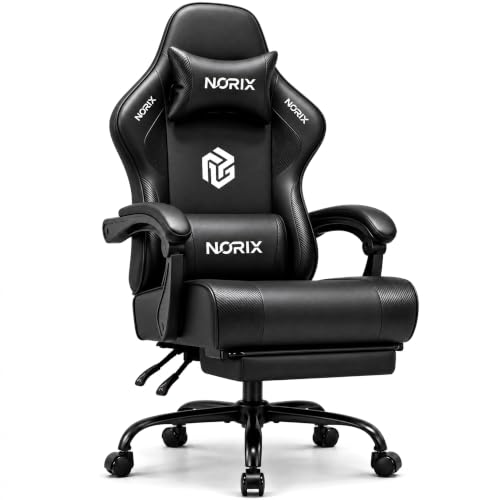
Video Gaming Chair for Adults with Footrest,Ergonomic Computer Living Room | 21-Inch Wide Seat, 330 lb Heavy Duty Load Capacity, Headrest, Adjustable Height, Reclining Backrest for Office or Gaming
Best for: Headrest comfort and a wide seat for living room or office setups.
Manufacturers list a 330 lb load capacity and adjustable height, making it a reasonable fit for a range of body sizes.
- 21-inch wide seat with headrest
- Adjustable height and reclining backrest
- Upholstery may show wear faster with heavy use
N-GEN GAMING Gaming Chair with Footrest

N-GEN GAMING Gaming Chair with Footrest, Lumbar, High-Back, All Black | Reclining Backrest, Linkage Armrests, Durable PU Leather, Adjustable Comfort for Extended Computer, Desk, or Home Office Use
Best for: PU leather upholstery and adjustable comfort for extended desk use.
Listings describe durable PU leather and linkage armrests, which appeal to buyers who want a clean, easy-to-wipe surface.
- Durable PU leather surface
- Linkage armrests and reclining backrest
- Leather-style surfaces can feel warm in hot rooms
GTPLAYER Big and Tall Office Chair

GTPLAYER Big and Tall Office Chair with Pocket Spring Cushion & Ergonomic Lumbar Support for Lower Back Pain Relief, High Back Computer Gaming Chair with Foot Rest, Soft Velvet Fabric, Deep Black
Best for: Soft fabric seating and lumbar support for office-focused use.
Its velvet fabric and pocket spring cushion suit people who prefer a softer feel than leather or PU surfaces.
- Soft velvet fabric seat
- Ergonomic lumbar support with footrest
- Fabric can attract dust and need regular cleaning
Large Ergonomic Gaming Chair, Black PU Leather

Large Ergonomic Gaming Chair, Black PU Leather, X-Large | Big & Tall Computer Chair with 4D Armrests, Adjustable Headrest & Lumbar Support, 22.8" Office Chair for Home & Gaming Room,
Best for: Adjustable armrests and a headrest for users who want fine-tuned upper-body support.
The listing highlights 4D armrests and a 22.8-inch seat, a combination that tends to appeal to larger users.
- 4D adjustable armrests
- Adjustable headrest and lumbar support
- Assembly can take more time than simpler models
Buying Guide
Lumbar Support and Back Design
Lumbar support is the feature that most affects comfort during long sessions. Look for a built-in lumbar cushion or pocket spring design that fills the natural curve of your lower back, and check whether the height or depth can be adjusted to fit your body.
A high back also helps by supporting the upper back and shoulders, which keeps your posture steadier when you lean back.
Recline Range and Tilt Control
A wider recline range gives you more options for resting between games or tasks, while a tilt lock lets you set the angle you prefer. Smooth, reliable recline mechanisms matter more than the maximum angle alone.
If you switch often between upright work and relaxed gaming, choose a chair with a backrest that adjusts easily without much effort.
Footrest and Seat Dimensions
A retractable or included footrest helps take pressure off the lower back and improves circulation during extended sitting. Check that the footrest extends far enough for your leg length.
Seat width and depth should fit your hips and thighs comfortably. Taller or heavier users should pay close attention to listed seat width and weight capacity so the cushion does not feel cramped or sag over time.
Frame Strength and Weight Capacity
The base, gas lift and frame determine how stable and long-lasting a chair will be. Heavy-duty bases with a sturdy metal frame tend to hold up better under daily use and resist wobbling when you lean back.
Always compare the stated weight capacity with your own body weight so the chair stays safe and supportive over the years.
Upholstery and Adjustable Arms
Leatherette and PU leather are easy to wipe clean and hold their shape well, while fabric options such as velvet can feel softer and breathe differently. Consider how warm you tend to get and how often you will clean the chair.
Adjustable armrests that move in height, width and angle let you keep your shoulders relaxed and your forearms supported, which reduces strain during typing or controller use.
FAQ
Is a high end ergonomic gaming chair worth the extra money?
It can be, especially if you sit for many hours a day and want better support for your back, hips and posture. Features like adjustable lumbar support, a strong frame and smooth recline often make a noticeable difference over time. Casual users may find that a simpler chair meets their needs.
What weight capacity should I look for?
Choose a chair with a weight capacity comfortably above your own body weight so the frame and gas lift are not stressed. Many larger-frame models list higher limits, so check the specifications before you buy. Staying within the rated limit helps the chair last longer.
Do I need a footrest on a gaming chair?
A footrest is helpful if you lean back often or want to reduce pressure on your lower back. It can also improve circulation when you sit for long periods. If you mostly sit upright at a desk, a footrest is a nice extra but not essential.
How important is seat width?
Seat width matters for comfort and for keeping your hips and thighs supported without pressure points. A seat that is too narrow can feel tight, while one that is too wide may not give enough side support. Measure your hips and compare them with the listed seat dimensions.
Is PU leather or fabric better for a gaming chair?
PU leather is durable and easy to wipe clean, which suits frequent use and spills. Fabric upholstery can feel softer and may breathe better in warm rooms. Your choice depends on your climate, how much you sweat and how much cleaning you want to do.
How often should I adjust my chair?
Take a moment to adjust your chair whenever you start a new session or notice discomfort. Set the seat height so your feet rest flat, adjust the lumbar support to fit the curve of your back and position the armrests so your shoulders stay relaxed. Small changes made regularly can help reduce fatigue.
Conclusion
If you want a chair built around wide-body comfort, strong weight capacity and a dependable footrest, the larger-frame models in this list are the best fit. Shoppers who prefer adjustable arms, a sturdy base and a clean look for both gaming and office use should focus on the mid-range options with strong lumbar support.
Whichever you choose, match the seat size, weight rating and recline range to your body and daily habits so the chair supports you comfortably for long sessions.
Related reading
- Top 5 Ergonomic Gaming Chairs with Footrest Picks for Every Need
- Gaming Chair vs Ergonomic Chair (2026): Which Is Better for Your Desk?
- Edx Ergonomic Gaming Chair Instructions: Step-by-Step Setup Guide
- 7 Best Staples Emerge Vortex Bonded Leather Ergonomic Gaming Chairs (2026)
About Caleb Morgan
Caleb Morgan is part of our editorial team and reviews and edits our fitness at work guides, checking product details against manufacturer specifications and owner feedback.