 By Lauren Holland
Updated November 2026
Finding a lifespan walking treadmill desk setup that fits your office comes down to four things: how fast the belt goes, how much weight it supports, how much floor space it takes, and whether the controls and extras help you actually use it every day. This guide compares four walking pads from the LifeSpan and similar lines, using manufacturer specifications and the patterns owners commonly describe in feedback, so you can match a model to your desk, your body and your workday.
Our Top Picks
Our top picks at a glance
- 1
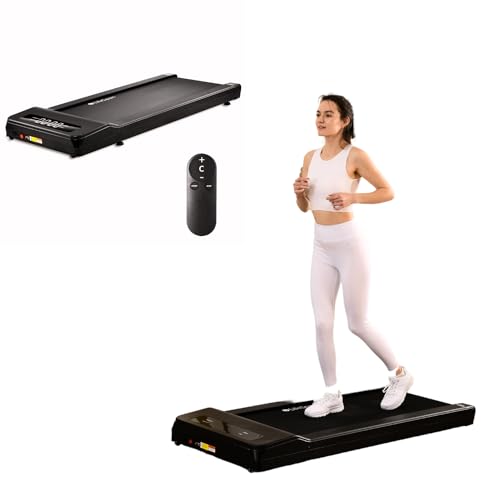 TOP CHOICEBest overallLifeSpan Fitness TX6 Under Desk Treadmill Ultra Quiet Walking Pad Treadmill at Home OfficeView on Amazon
- 2
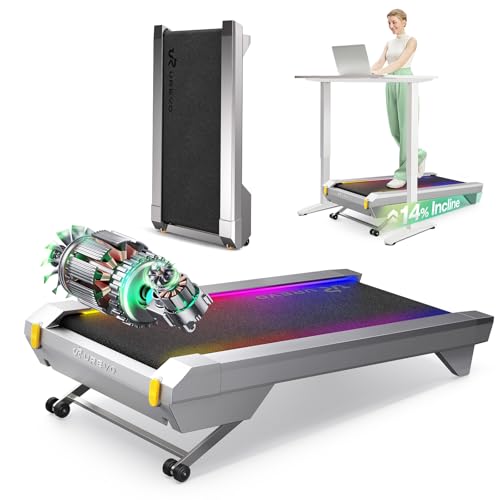 Best for app-connected trainingUREVO CyberPad Smart Walking Pad with 14% Auto InclineView on Amazon
- 3
 Best for small kitchens and tight officesWalking Pad Treadmill for Home with Incline and Handle BarView on Amazon
- 4
 Best budget pickLifespan Fitness TR5000B Pro+GlowUp Under Desk Treadmill Walking PadView on Amazon
Our Top Picks
Quick Comparison
| Product | Best for | Key feature |
|---|---|---|
| LifeSpan Fitness TX6 Under Desk Treadmill | Quiet home office walking | 0.4 to 6 mph range with 400 lb capacity |
| Lifespan Fitness TR5000B Pro+GlowUp Under Desk Treadmill | Steady, everyday walking at a lower top speed | LED display and 5.0HP motor, whisper-quiet operation |
| UREVO CyberPad Smart Walking Pad | Users who want incline and app tracking | 14% auto incline and AI-powered app |
| Walking Pad Treadmill for Home with Incline and Handle Bar | Small spaces and shared rooms | Foldable handles and compact footprint |
LifeSpan Fitness TX6 Under Desk Treadmill Ultra Quiet Walking Pad Treadmill at Home Office
LifeSpan Fitness TX6 Under Desk Treadmill Ultra Quiet Walking Pad Treadmill at Home Office, 0.4 to 6mph, 400lbs Capacity (Black)
Best for: Quiet home office walking with the widest speed range in this group
This model suits people who want to walk slowly while on calls and occasionally pick up the pace for a brisk session. The speed range runs from 0.4 to 6 mph, and the 400 lb capacity is listed by the manufacturer, which gives a comfortable margin for most adult users.
Key specs
- Speed range: 0.4 to 6 mph (manufacturer listed)
- Weight capacity: 400 lbs (manufacturer listed)
- Designed for under-desk and home office placement
Pros
- Wide speed range suits both slow desk walking and faster sessions
- Ultra-quiet operation is a common owner highlight for shared spaces
- Rated capacity leaves room for most adult body weights
Cons
- Top speed of 6 mph is more than most desk users need, and it can feel fast on a narrow belt
- Like most walking pads, it requires a clear, level floor area behind the desk
Bottom line: A strong all-round choice for people who want flexibility in speed and a quiet motor for a home office.
View on AmazonLifespan Fitness TR5000B Pro+GlowUp Under Desk Treadmill Walking Pad
Lifespan Fitness TR5000B Pro+GlowUp Under Desk Treadmill, Walking Pad for Home Workout & Office Use, Whisper Quiet 0.4 to 4.0 mph, Portable, Black, LED Display, 5.0HP Motor, 400lbs Capacity
Best for: Steady everyday walking at a lower top speed, with a budget-friendly approach
This model fits users who mainly want to log steady walking time at a comfortable pace while working. The 4.0 mph top speed covers most desk-walking needs, and the LED display makes it easy to track speed at a glance.
Key specs
- Speed range: 0.4 to 4.0 mph (listing name)
- Weight capacity: 400 lbs (listing name)
- 5.0HP motor and LED display (listing name)
- Portable design (listing name)
Pros
- Lower top speed suits typical desk walking without feeling rushed
- LED display gives clear feedback on speed during a session
- Portable build makes it easier to move or store
Cons
- The 4.0 mph ceiling limits options for faster interval walking
- Owners who want a folding frame should confirm the exact configuration before buying
Bottom line: A sensible pick for people who want a dependable walking pad for steady desk use rather than fast sessions.
View on AmazonUREVO CyberPad Smart Walking Pad with 14% Auto Incline
UREVO CyberPad Smart Walking Pad with 14% Auto Incline, Brushless Motorized Under Desk Treadmill for Office Fitness, Elegant Speed Lights, Spacious Surface, Digital Controller, AI-Powered App,Silver
Best for: Users who want incline and app tracking alongside desk walking
This is the most feature-heavy option here. The 14% auto incline adds challenge without raising speed, and the companion app and digital controller suit people who like to log and review their activity.
Key specs
- Auto incline: 14% (listing name)
- Brushless motorized drive (listing name)
- Digital controller and AI-powered app (listing name)
Pros
- Incline adds effort at low speeds, useful for a more active session
- App connectivity helps with tracking and routines
- Brushless motor is typically quieter and lower-maintenance than brushed designs, according to general manufacturer claims
Cons
- More electronics mean more to set up and possibly more to troubleshoot
- Owners who prefer a simple, no-app experience may find the features unnecessary
Bottom line: Best for people who value data, incline training and a modern control setup in a desk-friendly walking pad.
View on AmazonWalking Pad Treadmill for Home with Incline and Handle Bar
Walking Pad Treadmill for Home, Walking Pad with Incline and Handle Bar | Sturdy Foldable Handles Walking Pad with LED Display, Portable Quiet Under Desk Treadmills for small space at home office
Best for: Small spaces, shared rooms and tight home offices
This model is designed around a compact footprint and easy handling. The foldable handle bar and LED display make it practical for people who need to move the walking pad out of the way between sessions.
Key specs
- Incline function and handle bar (listing name)
- Foldable handles for portability (listing name)
- LED display (listing name)
Pros
- Compact design suits small rooms and apartments
- Handle bar adds stability for users who walk at lower speeds
- Easy to store when not in use
Cons
- Smaller footprints can mean a narrower belt, which some taller users find less comfortable
- Specific speed and capacity figures should be checked on the current listing before purchase
Bottom line: A practical choice for people who prioritize space savings and easy storage over a large walking surface.
View on AmazonBuying Guide
Belt size and walking surface
Belt width and length determine how naturally you can walk. Many users find a belt at least 16 inches wide comfortable, while taller users often prefer more length so their stride does not feel cramped. Measure your desk depth and the clearance behind it before choosing.
Good picks for this: LifeSpan Fitness TX6 Under Desk Treadmill, Lifespan Fitness TR5000B Pro+GlowUp Under Desk Treadmill
Speed range and top speed
For most desk work, a range that starts near 0.5 mph and tops out around 3 to 4 mph is enough for steady walking. Higher maximum speeds give more room for brisk sessions but are rarely needed while typing. Check whether the low end is slow enough for reading or calls.
Good picks for this: LifeSpan Fitness TX6 Under Desk Treadmill, Lifespan Fitness TR5000B Pro+GlowUp Under Desk Treadmill
Weight capacity and user size
Manufacturers publish a maximum user weight. Choose a model whose rated capacity comfortably exceeds your body weight, and remember that the rating applies to the motor and frame under normal use, not dynamic loads from fast stepping.
Good picks for this: LifeSpan Fitness TX6 Under Desk Treadmill, Walking Pad Treadmill for Home with Incline and Handle Bar
Incline and training variety
Incline adds intensity without speeding up the belt, which can help if you want a harder workout at a modest pace. Look for a smooth, adjustable incline rather than a fixed angle, and confirm the maximum grade in the specifications.
Good picks for this: UREVO CyberPad Smart Walking Pad, Walking Pad Treadmill for Home with Incline and Handle Bar
Noise and motor type
Brushless motors are generally quieter and need less maintenance than brushed motors, according to common manufacturer descriptions. If you share a room or take calls while walking, noise levels matter as much as speed.
Good picks for this: LifeSpan Fitness TX6 Under Desk Treadmill, UREVO CyberPad Smart Walking Pad
Portability, folding and storage
If you need to move the walking pad between rooms or store it, check weight, handle design and any folding function. A heavier frame is usually more stable but harder to lift.
Good picks for this: Walking Pad Treadmill for Home with Incline and Handle Bar, Lifespan Fitness TR5000B Pro+GlowUp Under Desk Treadmill
Controls, display and app features
Simple controls with a clear LED or digital display are easy to use from a seated position. App connectivity can help with tracking but is optional for most desk walkers. Choose the level of technology you will actually use.
Good picks for this: UREVO CyberPad Smart Walking Pad, Lifespan Fitness TR5000B Pro+GlowUp Under Desk Treadmill
FAQ
Can I type while using a lifespan walking treadmill desk?
Many people do, especially at slow speeds. Start at the lowest setting and increase gradually until you can type comfortably. If your typing becomes erratic, slow down.
Do walking pads need a special mat or flooring?
A level, hard surface or a low-pile mat is usually recommended. Check the manufacturer’s floor guidance for your specific model.
How much clearance do I need behind the desk?
Plan for enough room to step on and off safely, plus a buffer behind the belt. Measure your space before ordering.
Is a walking pad a substitute for regular exercise?
It can add daily movement and help you break up sitting time, but it does not replace a structured exercise plan. Consult a healthcare professional if you have joint, heart or balance concerns before starting.
Which speed is best for desk walking?
Many desk walkers settle between 1 and 2 mph while working. Your ideal speed depends on your comfort, fitness and task.
How do I keep a walking pad quiet?
Place it on a mat, keep the belt tensioned and cleaned according to the manual, and avoid running it at high speed in shared spaces.
Conclusion
For most home offices, the LifeSpan Fitness TX6 offers the widest speed range, while the Lifespan Fitness TR5000B Pro+GlowUp suits steady, lower-speed walking. The UREVO CyberPad is the pick for incline and app tracking, and the compact walking pad with handle bar fits small rooms best. Match the model to your space, your typing habits and how much technology you want.
Sources
- Physical activity guidelines and how regular movement supports health (cdc.gov)
- Consumer product safety information for home exercise equipment (cpsc.gov)
- Exercise guidance from the American College of Sports Medicine (acsm.org)
Related reading
- Lifespan TR1200-DT3 Under Desk Treadmill: Lifespan, Care and Replacement Guide
- Yagud Under Desk Treadmill: Setup, Safety and Use Guide (2026)
- Walkingpad A1 Pro Folding Under Desk Treadmill: Setup, Use and Buying Guide
- Walkingpad A1 Pro Foldable Under Desk Treadmill: Setup, Safety and Use Guide
About Lauren Holland
Lauren Holland is part of our editorial team and reviews and edits our fitness at work guides, checking product details against manufacturer specifications and owner feedback.