By Lauren Holland
Updated November 2026
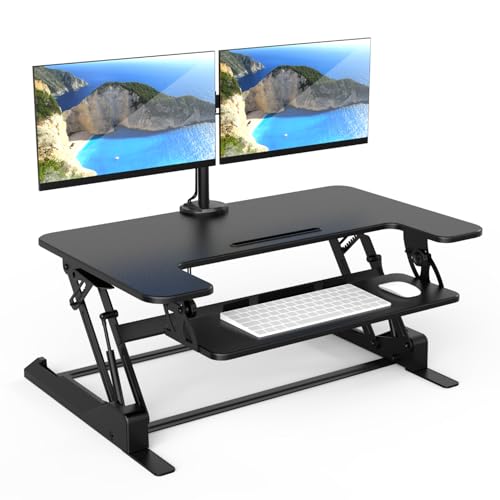
A platform for standing desk is a raised surface that sits on top of your existing desk and lets you switch between sitting and standing without buying a new workstation. This guide covers how to pick the right size, check the height, and set it up so it stays stable and comfortable through a full workday. You will need about 30 minutes and a tape measure.
Step 1: Measure Your Desk and Your Monitor Setup
Start by measuring the depth and width of your current desk, then note how much clearance you have above the surface. Most platforms are sized by footprint, so a platform that is too deep will push your keyboard too far from the edge, while one that is too narrow will leave your monitors hanging off. Measure the full span of your monitors and any keyboard tray you use. Manufacturers specify maximum load ratings, so also add up the approximate weight of your monitors, laptop dock and accessories.
Shopping for one? See our guide: 6 Best Standing Desk for Home Office (2026): Expert Picks.
Step 2: Choose the Right Type of Platform
Platforms come in a few common styles. A basic riser is a fixed or manually adjusted shelf that holds a monitor and keyboard. A sit-stand converter uses a gas-spring or crank mechanism to raise the whole top with one hand. A larger tabletop-style platform covers most of the desk and can handle two monitors. If you change position often, a converter with a smooth lift is usually more practical than a fixed riser. If you only stand for short periods, a simple riser may be enough. For more on height settings once the platform is in place, see Standing Desk Height Adjustment: A Step-by-Step Guide for Setting It Right.
Step 3: Set the Correct Working Height
Once the platform is on your desk, set the height so your elbows stay at roughly 90 degrees when your hands rest on the keyboard. The top of your monitor should sit at or just below eye level, roughly an arm’s length away. When standing, keep your shoulders relaxed and your wrists straight. If the keyboard sits too high, your shoulders will creep up; too low, and you will hunch forward. Check the platform once a week for the first few weeks, because the mechanism can settle and drift slightly over time.
Step 4: Stabilize the Setup and Manage Cables
A wobbly platform causes eye strain and keeps you tense. Make sure all four feet sit flat on the desk surface, and tighten any locking bolts after the first few uses. Leave a small gap for cables so they do not pull against the platform when you lift it. Route power and USB cables with clips or a cable tray so nothing catches when you raise or lower the top.
Step 5: Build a Sit-Stand Routine
Begin with short standing blocks. A common starting pattern is 20 to 30 minutes standing, then 30 to 60 minutes seated, then repeat. Adjust as your legs adapt. Many people find that standing for the first hour after lunch is especially comfortable. For movement ideas that fit into those blocks, look at Standing Desk Exercises at Work: 7 Moves for Your Workday.
Step 6: Check Your Setup After One Week
After a week, review how your neck, shoulders, lower back and feet feel. If one area keeps aching, adjust the height in small increments before changing anything else. Remember that a platform is only one part of the setup. Your chair, footrest and screen position all affect comfort. For a broader setup walkthrough, see Standing Workstation for Desk: A Step-by-Step Setup Guide.
Common mistakes
- Buying a platform that is too deep, which pushes the keyboard past a comfortable reach.
- Ignoring the load rating and overloading a lightweight riser with multiple monitors.
- Standing for hours on the first day instead of building up gradually.
- Leaving the monitor too low, which encourages a forward head posture.
- Skipping the stability check, so the platform shifts when you type.
Recommended gear
A sturdy anti-fatigue mat helps reduce strain when you stand for longer periods, and many people find it makes the platform feel more comfortable overall. View on Amazon
A dual monitor arm can free up space on the platform surface and lets you fine-tune screen height independently of the desk. View on Amazon
A cable management tray keeps cords out of the way so the platform can move smoothly without snagging. View on Amazon
FAQ
Can a platform for standing desk fit any desk?
Most platforms fit standard rectangular desks, but you should check the footprint against your desk depth and width before buying. Corner or curved desks may need a custom or specialty platform.
How do I know if the platform is too heavy for my desk?
Check the desk’s own weight rating and the platform’s load rating, then add the weight of your monitors and accessories. If the total is close to either limit, choose a sturdier model or a smaller setup.
Is a platform safe to use all day?
Standing in alternating blocks is generally easier on the body than standing for hours without breaks. If you have back, joint or circulation concerns, consult a healthcare professional before changing your work routine.
Conclusion
A platform for standing desk is one of the simplest ways to add movement to a desk job. Measure your space, set the height so your elbows and eyes are in the right place, and build up your standing time gradually. Review the setup after a week and adjust as needed.
Ready to choose one?
About Lauren Holland
Lauren Holland is part of our editorial team and reviews and edits our fitness at work guides, checking product details against manufacturer specifications and owner feedback.