By Lauren Holland
Updated November 2026
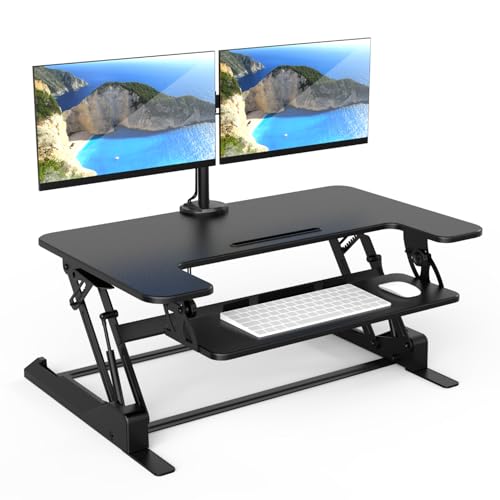
A standing desk table topper is a platform that sits on top of your existing desk and lifts your keyboard, mouse and monitor to standing height. You get the benefit of standing for part of your workday without replacing your desk. This guide walks you through choosing the right size, positioning it, and setting it up so your neck, shoulders and wrists stay in a neutral position.
Step 1: Measure Your Desk and Your Body
Start with the numbers. Measure the usable depth and width of your current desk, leaving a little clearance at the back for cables. Then measure your standing elbow height, which is the distance from the floor to the bend of your elbow when your arms hang relaxed. Your keyboard surface should land close to that height when you stand.
Shopping for one? See our guide: 6 Best Standing Desk for Home Office (2026): Expert Picks.
Check the topper’s stated dimensions against your measurements. Manufacturers usually list a maximum weight capacity and a working height range, so confirm that your monitor and any accessories fit within both.
Step 2: Set Up the Work Surface
Place the topper so the keyboard sits at a height where your forearms are roughly parallel to the floor when you type, with your elbows bent at about 90 degrees. Your monitor top should sit at or slightly below eye level. If you use a laptop, add a separate keyboard and an external monitor, since a laptop alone tends to push your head forward.
Step 3: Adjust the Height for Sitting and Standing
Most toppers have a manual or gas-assisted lift. Set one height for standing and another for sitting, and write the settings down or mark them with tape. Your chair should still work at its own height, so keep your feet flat on the floor or a footrest when seated.
What You Need
- A tape measure
- A keyboard and external monitor if you use a laptop
- A cable tray or clips to manage cords
- A anti-fatigue mat for standing periods
- A timer or reminder app to prompt position changes
Step 4: Build a Switching Routine
Do not stand for the whole day. Many people start with 20 to 30 minutes of standing per hour and increase gradually as their legs and back adjust. Change positions when you notice fatigue, not only when a timer goes off.
| Phase | Suggested Time | Notes |
|---|---|---|
| Week 1 | 10 to 15 minutes per hour | Short standing blocks |
| Week 2 | 20 minutes per hour | Shift weight between feet |
| Week 3 onward | 30 minutes per hour | Sit when tired |
For more on building this habit, see Using a Standing Desk: 7 Setup and Habit Steps for Your Workday.
Step 5: Add Movement While You Stand
Standing still for long stretches can cause discomfort, so mix in light movement. Shift your weight, rock from heel to toe, or do a few calf raises. For a quick routine, see Standing Desk Exercise Basics and Standing Desk Exercises at Work: 7 Moves for Your Workday. If your legs feel tired, Standing Legs for Desk: How to Stand Comfortably for Hours at Work covers posture tips that help.
Common Mistakes
- Leaving the monitor too low, which forces you to crane your neck downward.
- Placing the topper on an unstable desk surface, which can cause wobbling.
- Standing on hard floors without a mat.
- Skipping the sitting setting, so you never give your legs a break.
- Overloading the platform beyond its stated weight limit.
Recommended Gear
- Anti-fatigue standing mat: cushions your feet and encourages small weight shifts. View on Amazon
- Cable management tray: keeps cords out of your way as you raise and lower the topper. View on Amazon
- Laptop stand with external keyboard: brings the screen to eye level if you work from a laptop. View on Amazon
FAQ
Can a standing desk table topper fit any desk?
Most toppers fit standard office desks, but you need to check the depth, width and weight limit against your own desk. Corner or curved desks may need a model designed for that shape.
How long should I stand each hour?
Many people begin with 10 to 15 minutes per hour and build up slowly. If you have joint, back or circulation concerns, consult a healthcare professional before increasing your standing time.
Do I still need an ergonomic chair?
Yes. A topper gives you standing height, but you will still sit for part of the day, so a supportive chair set at the right height remains important.
Conclusion
A standing desk table topper lets you alternate between sitting and standing without replacing your desk. Measure carefully, set the keyboard and monitor to the right heights, and build your standing time gradually. Small, regular position changes will do more for comfort than long stretches on your feet.
Related reading
- Yoga at Desk Exercises: 10 Seated and Standing Moves for Work
- U Shaped Standing Desk: How to Choose and Set One Up Right
Ready to choose one?
About Lauren Holland
Lauren Holland is part of our editorial team and reviews and edits our fitness at work guides, checking product details against manufacturer specifications and owner feedback.