By Lauren Holland
Updated November 2026
An adjustable standing desk conversion lets you turn a regular desk into a sit-stand workstation without buying a new desk. You will check whether your current setup can handle a converter, choose the right type, set the working height, and build a routine you can actually stick with. Most of the work is measuring and small adjustments, and a careful setup usually takes under an hour.
Check Whether Your Desk Can Be Converted
Before you buy anything, confirm that your desk has enough surface depth and load capacity. Most desktop converters need a surface about 24 to 30 inches deep so the keyboard and monitor sit fully on the platform. Look up the weight rating of your desk and the converter, and make sure the combined load, including monitors, a laptop, and any accessories, stays comfortably below both limits. A wobbly desk frame will make a converter feel unstable, so test your current desk by pressing on the corners before you start.
Shopping for one? See our guide: 7 Best Adjustable Height Ergonomic Chairs for Standing Desks (2026).
Choose the Right Type of Converter
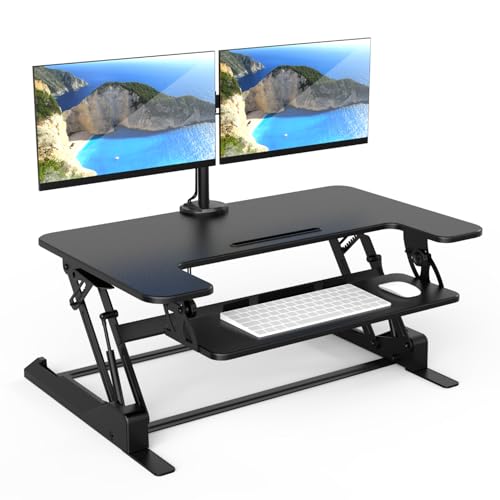
Desktop converters fall into two main groups. Riser-style units sit on top of your existing desk and lift the monitor and keyboard together, which works well for single-monitor setups. Keyboard-tray models keep the monitor on the original desk surface and lower the keyboard platform below it, which suits people who prefer the monitor at a fixed height. If you use two monitors or a large display, look for a model with a wide, deep platform that can hold them without tipping.
Set Up the Converter Step by Step
- Clear the desk completely and wipe the surface.
- Place the converter in the center, leaving room behind it for cables.
- Assemble the unit according to the manufacturer’s instructions and tighten all fasteners.
- Move your monitor, keyboard, and mouse onto the platform.
- Route cables through the back so nothing pulls when you raise the unit.
Set Your Working Height
Sit in your chair with your feet flat on the floor and your knees at roughly a 90-degree angle. Adjust the chair so your forearms rest at about a right angle on the keyboard tray. Then set the converter so your elbows stay near 90 degrees while you type. For standing, most people find that the same keyboard height works, with the monitor top at or just below eye level. Check your own measurements, since body proportions vary and the right setting is the one that keeps your shoulders relaxed.
Recommended gear
A sturdy anti-fatigue mat helps your feet and lower legs feel more comfortable during standing periods. View on Amazon
A cable management tray keeps power and data cords from catching when you move the platform up and down. View on Amazon
A monitor arm or riser can help you position a display at eye level when your conversion platform is not tall enough. View on Amazon
Common mistakes
- Buying a converter that is too shallow for your keyboard and monitor.
- Leaving the monitor too low, which causes neck strain when standing.
- Skipping the weight rating check and overloading a flimsy platform.
- Standing for hours straight instead of alternating between sitting and standing.
- Ignoring cable slack, which can pinch or disconnect devices when you raise the unit.
Adjustable Standing Desk Conversion FAQ
Do I need a new desk for an adjustable standing desk conversion?
No. A converter sits on top of your existing desk or replaces only the keyboard area, so you can keep the surface you already use. Just confirm the depth and weight limits first.
How long should I stand during the day?
Many people start with short standing blocks of 15 to 30 minutes and build up gradually, alternating with sitting. If you have joint, back, or circulation concerns, consult a healthcare professional before changing how long you stand.
Can I convert a desk that is not height-adjustable?
Yes. A converter raises the work surface regardless of whether the base desk moves, so most standard desks can be converted as long as they are stable and deep enough.
Conclusion
A successful adjustable standing desk conversion comes down to fit, stability, and a height that matches your body. Check your desk’s depth and weight rating, choose a converter type that suits your monitors, and set the height so your elbows and eyes stay comfortable. Then alternate sitting and standing throughout the day to build a habit that lasts.
Related reading
- Desktop Height Adjustable Standing Desk: Setup Steps and Height Guide
- Adjustable Desktop Standing Desk: How to Choose and Set One Up (Step-by-Step)
- Yoga at Desk Exercises: 10 Seated and Standing Moves for Work
Ready to choose one?
About Lauren Holland
Lauren Holland is part of our editorial team and reviews and edits our fitness at work guides, checking product details against manufacturer specifications and owner feedback.