
 By Lauren Holland
Updated November 2026
An ergonomic desk chair for lower back pain should support the natural inward curve of your spine, adjust to your height and body size, and let you change position without effort. The picks below are chosen from manufacturer specifications, brand reputation and common owner feedback patterns, with attention to adjustable lumbar support, seat depth, recline and armrest range.
Best overall: BestGlory Ergonomic Office Chair – View on Amazon
Best for big and tall users: GTPLAYER Big and Tall Office Chair – View on Amazon
Best for budget-minded buyers: GABRYLLY Ergonomic Office Chair – View on Amazon
Best for adjustable arms: ELABEST X100 Ergonomic Mesh Office Chair – View on Amazon
Best for mesh breathability: MUXX.STIL Office Chair – View on Amazon
Best for heavier loads: TRALT Office Chair Ergonomic Desk Chair – View on Amazon
Best for a premium leather look: Stella Mia Office Chair – View on Amazon
Our Top Picks
| Product | Best for | Key feature |
|---|---|---|
| BestGlory Ergonomic Office Chair | Overall lower back support | Adjustable lumbar and headrest |
| TRALT Office Chair Ergonomic Desk Chair | Heavier loads | 330 lb rated, flip-up armrests |
| MUXX.STIL Office Chair | Breathable all-day sitting | Mesh back, adjustable lumbar |
| GTPLAYER Big and Tall Office Chair | Larger body frames | Pocket spring cushion, footrest |
| ELABEST X100 Ergonomic Mesh Office Chair | Customizable arm positions | 5D flip-up arms, 3D lumbar |
| GABRYLLY Ergonomic Office Chair | Easy tilt adjustment | 90-120° tilt lock, wide cushion |
| Stella Mia Office Chair | Padded executive comfort | Padded flip-up armrests |
BestGlory Ergonomic Office Chair with Adjustable Lumbar Support & Headrest
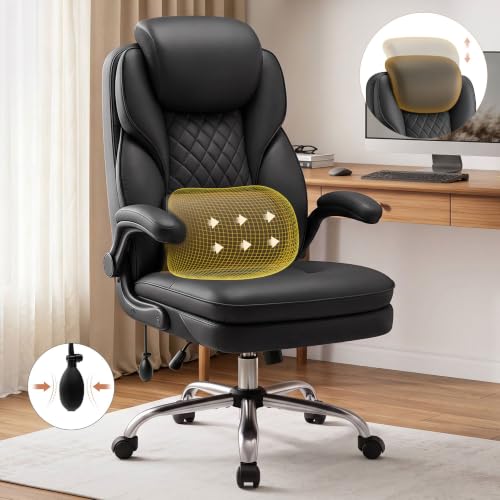
BestGlory Ergonomic Office Chair with Adjustable Lumbar Support & Headrest | Executive Computer Desk Chair with Double Seat Cushion, Big and Tall Gaming Chair for Lower Back Pain Relief
Best for: Overall lower back support
This chair suits people who want a wide range of lumbar and head support in one setup, including those who sit through long meetings and deep-focus work blocks.
Pros
- Adjustable lumbar support helps fit the curve of your lower back
- Double seat cushion adds padding for long sessions
Cons
- Larger footprint than compact task chairs
TRALT Office Chair Ergonomic Desk Chair with Lumbar Support Black

330 LBS Home Office Desk Chairs with Headrest, Reading Chair with Flip-up Armrests, Comfortable Computer Chairs (1, Black) TRALT Office Chair Ergonomic Desk Chair with Lumbar Support Black, 1
Best for: Heavier loads
Shoppers who need a sturdy frame and a rated weight capacity will find this chair a practical match for a home office with frequent use.
Pros
- Manufacturer lists a 330 lb weight rating
- Flip-up armrests clear space for desk approach
Cons
- Lumbar adjustment is less granular than premium models
MUXX.STIL Office Chair, Ergonomic Desk Chair with Adjustable Lumbar Support

MUXX.STIL Office Chair, Ergonomic Desk Chair with Adjustable Lumbar Support and Flip up Armrest, Breathable Mesh Computer Chair for Home Office, Khaki
Best for: Breathable all-day sitting
This is a fit for people who get warm in padded seats and want air circulation across the back during long sessions.
Pros
- Breathable mesh back reduces heat buildup
- Adjustable lumbar support and flip-up armrests
Cons
- Mesh feels firmer than foam for some users
GTPLAYER Big and Tall Office Chair with Pocket Spring Cushion

GTPLAYER Big and Tall Office Chair with Pocket Spring Cushion & Ergonomic Lumbar Support for Lower Back Pain Relief, High Back Computer Gaming Chair with Foot Rest, Soft Velvet Fabric, Deep Black
Best for: Larger body frames
Taller or heavier users often find that standard task chairs feel cramped, and this model is built with a broader seat in mind.
Pros
- Pocket spring cushion supports weight distribution
- Includes a foot rest for leg support
Cons
- Velvet fabric shows dust and needs regular brushing
ELABEST X100 Ergonomic Mesh Office Chair with Footrest

ELABEST X100 Ergonomic Mesh Office Chair with Footrest, Big and Tall Hone Desk Chair with 5D Flip-Up Arms, Adjustable 3D Lumbar Support,Gaming & Executive Computer Chairs
Best for: Customizable arm positions
Users who switch between typing, reading and phone calls will appreciate arm adjustments that can move in several directions.
Pros
- 5D flip-up armrests adapt to different desk heights
- 3D lumbar support tracks multiple back contours
Cons
- Many adjustment points take time to learn
GABRYLLY Ergonomic Office Chair, High Back Home Desk Chair with Headrest

GABRYLLY Ergonomic Office Chair, High Back Home Desk Chair with Headrest, Flip-Up Arms, 90-120° Tilt Lock and Wide Cushion, Big and Tall Mesh Chairs for Man Woman, Black Task Chair
Best for: Easy tilt adjustment
This chair suits people who prefer to recline briefly between tasks and want a tilt lock that holds the angle they choose.
Pros
- 90-120° tilt lock offers recline options
- Wide cushion and high back for upper support
Cons
- Fewer premium materials than higher-end chairs
Buying Guide
Adjustable Lumbar Support
Look for a chair where you can adjust the height and depth of the lumbar support so it fits the natural inward curve of your lower back. Support that sits too high or too low can leave the lumbar area unsupported and make back pain worse over a long workday.
Chairs with an adjustable lumbar pad let you fine-tune the support as you shift positions, which is especially helpful if your pain changes during the day.
Seat Depth and Width
A seat that is too deep can press the back of your knees and push you forward off the backrest, which defeats the purpose of lumbar support. Choose a chair whose seat depth lets you sit with a gap of a few finger widths between the seat edge and the back of your knees.
Width matters too, especially for larger body types. A wider seat with a generous cushion helps distribute weight evenly and prevents pressure points on the hips and thighs.
Recline and Tilt Control
Gentle recline lets you shift weight off the lower spine and change posture without getting out of the chair. Look for a tilt lock or a tension knob so you can set the recline angle and keep the backrest steady when you lean back.
A synchro-tilt or multi-position mechanism can help the backrest move with you, keeping your spine supported across a range of positions.
Armrest Range and Padding
Armrests that flip up, swivel and slide let you pull the chair closer to the desk without bumping into the arms. Adjustable height helps keep your shoulders relaxed, which in turn reduces tension that can travel down into the lower back.
Padded arms are a comfort bonus, but make sure they do not push your elbows out of a natural resting position.
Build Quality and Weight Capacity
Check the stated weight capacity and frame materials before you buy. A sturdy base, a reliable gas lift and firm stitching tend to hold up better over time, so the chair keeps supporting you well after months of daily use.
FAQ
Can an ergonomic desk chair really help with lower back pain?
A well-fitted ergonomic chair can reduce strain on the lower back by supporting the spine’s natural curve and encouraging better posture. It is not a cure for every type of back pain, so ongoing or severe symptoms should be checked by a healthcare professional.
How high should the lumbar support sit?
The lumbar pad should rest in the curve just above your belt line, roughly where your lower back naturally arches inward. Adjust it so you feel gentle support without being pushed forward in the seat.
Should my feet touch the floor when I sit?
Yes, your feet should rest flat on the floor or on a footrest with your knees roughly level with or slightly below your hips. If the seat height is wrong, adjust the gas lift before anything else.
Is a mesh chair better than a padded chair for back pain?
Mesh backs tend to be breathable and can offer a more flexible feel, while padded backs may feel more cushioned. The better choice depends on whether you run warm and how much support your lower back needs, so test the lumbar fit above all else.
How long should I sit before taking a break?
Standing up, walking briefly or changing position every 30 to 60 minutes can help reduce stiffness. A good chair supports movement but does not replace regular breaks.
Conclusion
If you want a versatile chair with strong lumbar adjustment for everyday desk work, the best overall pick is a strong all-round choice. Those who need extra width, seat depth and weight capacity should look at the big and tall options, while shoppers on a tighter budget can find solid support in the value picks.
Whatever you choose, prioritize adjustable lumbar support and a seat that fits your body, since those two features matter most for lower back comfort over the long run.
Related reading
- Ergonomic Desk Chair Back Pain: 3 Best Picks Compared for Long Workdays
- 3 Best Ergonomic Pillows for Office Chair Picks for Lower Back Pain (2026)
- 3 Best Standing Desk Lower Back Chairs for Pain Relief (2026)
- Top 6 Ergonomic Chairs for Herniated Disc Picks Compared for Back Pain Relief
- Ergonomic Chair for Upper Back Pain: 6 Best Picks for Every Need (2026)
- Ergonomic Chair for Low Back Pain: 7 Best Picks Compared (2026)
About Lauren Holland
Lauren Holland is part of our editorial team and reviews and edits our fitness at work guides, checking product details against manufacturer specifications and owner feedback.