By Lauren Holland
Updated November 2026
A stand for standing desk is the part that raises and lowers your work surface, and getting it right is the difference between a comfortable standing setup and sore feet by mid-afternoon. This guide walks you through the main types, how to match one to your desk and space, and how to set the height so your wrists, elbows and neck stay relaxed.
Choose the Right Type of Stand for Standing Desk Use
Most people encounter three main options, and each suits different needs.
Shopping for one? See our guide: 6 Best Standing Desk for Home Office (2026): Expert Picks.
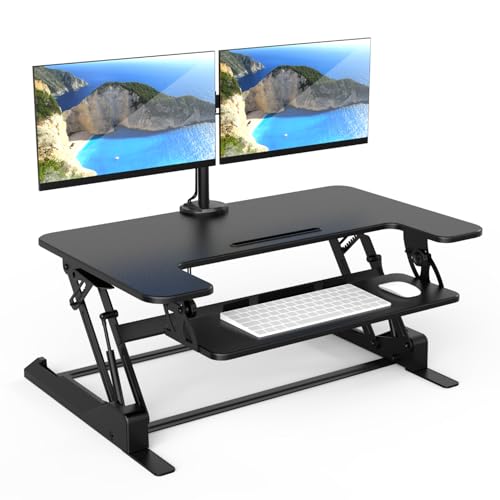
- Desktop converters sit on top of your existing desk and lift your monitor and keyboard. They work well if your desk is already the right depth and you want to keep it.
- Electric sit-stand frames replace your desk legs and adjust with a motor, usually with a memory preset for seated and standing heights.
- Manual crank frames use a hand crank or gas spring. They are simpler mechanically but slower to adjust.
Check the weight rating before you buy. Manufacturers list a maximum load for the surface and monitor arms, and you should add up your monitors, laptop dock and accessories to make sure you stay well under it.
Set the Height for Your Stand for Standing Desk Setup
Good height matters more than any feature. Use these steps to dial it in:
- Stand relaxed with your shoulders down and your feet flat, about shoulder-width apart.
- Bend your elbows to roughly 90 to 100 degrees and let your forearms rest on the work surface.
- Set the keyboard height so your wrists stay straight, not bent up or down.
- Place the top edge of your monitor at or slightly below eye level, roughly an arm’s length away.
- Leave enough knee clearance so you can shift your weight without bumping the desk.
Re-check the height after a week. Many people discover they need a small adjustment once they settle into a routine.
Plan Your Space and Standing Routine
Stand for standing desk time in short blocks rather than all day. Many people start with 15 to 20 minutes per hour and build up gradually. Keep a supportive mat under your feet if you stand on hard flooring, and shift your weight from one leg to the other every few minutes. For more movement ideas you can do at the desk, see Stand Up Desk Exercises: 9 Moves to Do Standing at Work and Simple Standing Desk Exercises: 8 Moves to Do at Work.
Common Mistakes to Avoid
- Standing still for long periods. Locked knees and frozen posture cause fatigue faster than you expect.
- Setting the monitor too low, which pushes your head forward and strains your neck.
- Skipping the transition. Go from sitting to standing gradually instead of stopping and starting all at once.
- Ignoring the cable routing, which can snag or pull when the desk moves.
- Assuming one height fits everyone. Adjust for your own body and the chair you use when sitting.
Recommended Gear
A standing mat reduces foot and leg fatigue on hard floors. View on Amazon
A monitor arm lets you raise the screen to eye level without stacking books under it. View on Amazon
A cable management tray keeps power and data lines out of the way when the desk changes height. View on Amazon
FAQ
How long should I stand at a standing desk each day?
Most people start with 15 to 20 minutes per hour and increase slowly as their body adjusts. If you have joint, back or circulation concerns, consult a doctor or physical therapist before changing your routine. For another angle, check out 6 Best Dual Monitor Stands for Standing Desk Setups in 2026.
Do I need an electric stand for standing desk use?
No. A manual crank or a desktop converter can work well, especially if you change height only a few times a day. Electric models are more convenient if you switch positions often.
What height should my monitor be?
Set the top of the screen at or just below eye level, about an arm’s length away. This keeps your neck in a neutral position whether you sit or stand.
Conclusion
Choosing the right stand for standing desk use comes down to matching the frame to your workspace and setting the height around your own elbows, wrists and eyes. Start with short standing blocks, adjust as you go, and build the habit gradually. Small, consistent changes will do more for your comfort than any single piece of gear.
Related reading
- Yoga at Desk Exercises: 10 Seated and Standing Moves for Work
- Standing Workstation for Desk: A Step-by-Step Setup Guide
- Standing Desk for Treadmill: Setup, Safety and Buying Steps
- Standing Desk Leg Exercises: 7 Moves to Keep Legs Active at Work
Ready to choose one?
About Lauren Holland
Lauren Holland is part of our editorial team and reviews and edits our fitness at work guides, checking product details against manufacturer specifications and owner feedback.