
 By Lauren Holland
Updated November 2026
A dual monitor stand for standing desk setups has to do three things well: hold two screens steady at eye level, adjust quickly when you switch between sitting and standing, and fit the clamp or grommet mounting your desk already allows. The picks below are based on manufacturer specifications, product listing details and common owner feedback patterns, focusing on weight capacity, height range, mounting type and how the arms move.
Our top picks at a glance
- 1
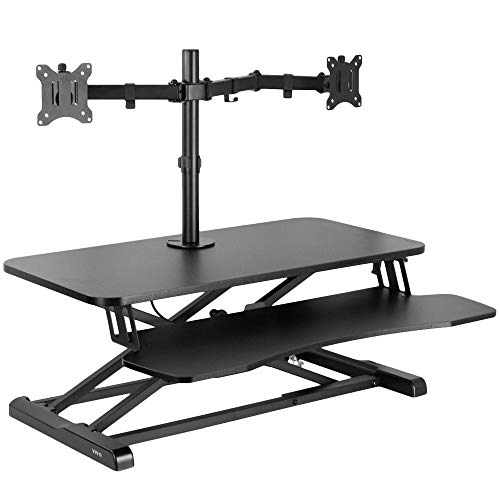 TOP CHOICEBest overallVIVO Standing Desk Converter with Dual Monitor Stand, 32" Black TopView on Amazon
- 2
 TOP CHOICEBest for a budget setupVIVO STAND-V002F Dual LED LCD Monitor Free-Standing Desk StandView on Amazon
- 3
 TOP CHOICEBest for gaming monitorsHUANUO FlowLift Dual Monitor StandView on Amazon
- 4
 Best for clamp mountingVIVO Dual Monitor Desk Mount, for 13" to 30" ScreensView on Amazon
- 5
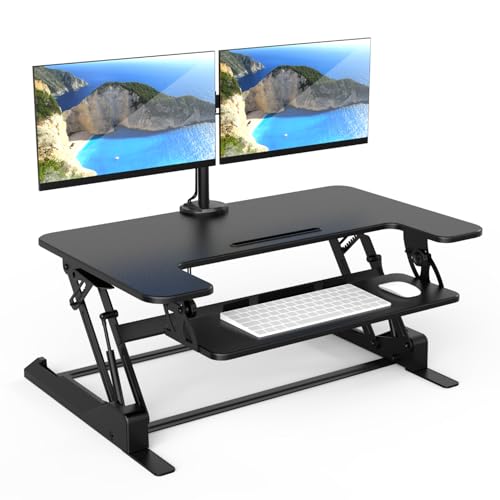 Best for a wide deskMount-It! Standing Desk Converter Dual MonitorView on Amazon
- 6
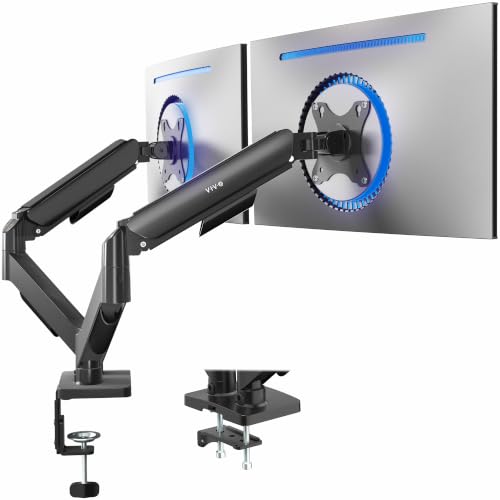 Best for larger screensVIVO AeroPoise Dual Monitor Stand, for 17" to 32" ScreensView on Amazon
Our Top Picks
Quick Comparison
| Product | Best for | Key feature |
|---|---|---|
| VIVO Standing Desk Converter with Dual Monitor Stand | Overall use with a sit-stand converter | Holds 33 lbs desktop |
| VIVO STAND-V002F Dual LED LCD Monitor Free-Standing Desk Stand | Budget setups without clamping | Free-standing base, 27-inch screens |
| HUANUO FlowLift Dual Monitor Stand | Gaming and larger monitors | Full motion, 13–32 inch range |
| VIVO Dual Monitor Desk Mount STAND-V002 | Clamp-mounted desks | 22 lbs per arm capacity |
| Mount-It! Standing Desk Converter Dual Monitor | Wide desks and mixed use | 36-inch wide platform |
| VIVO AeroPoise Dual Monitor Stand | Bigger screens and heavier panels | Mechanical spring arms, 19.8 lbs |
VIVO Standing Desk Converter with Dual Monitor Stand, 32″ Black Top
VIVO Standing Desk Converter with Dual Monitor Stand, 32" Black Top | Desktop Holds 33 lbs, Height Adjustable, Wide Keyboard Tray, With Dual 13" to 30" Monitor Mount, Black Frame, DESK-V000K-M2
Best for: Overall use with a sit-stand converter
This suits people who want one unit that sits on an existing desk, raises the screens, and frees up room for a keyboard tray.
Pros
- Desktop is rated for 33 lbs
- Includes a wide keyboard tray and dual monitor mounts
Cons
- Takes up noticeable desk space
VIVO STAND-V002F Dual LED LCD Monitor Free-Standing Desk Stand
VIVO STAND-V002F Dual LED LCD Monitor Free-Standing Desk Stand for 2 Screens up to 27 Inch Heavy-Duty Fully Adjustable Arms with Max VESA 100x100mm
Best for: Budget setups without clamping
Good for people whose desk surface can’t take a clamp or grommet, since the base rests on the desk. If you want more background, see Standing Desk Table Topper: A Step-by-Step Guide to Setup (2026).
Pros
- Free-standing base needs no drilling or clamping
- Supports screens up to 27 inches with 100×100 VESA
Cons
- Base footprint can crowd a small desk
HUANUO FlowLift Dual Monitor Stand
HUANUO FlowLift™ Dual Monitor Stand, Fully Adjustable Gaming Monitor Desk Mount for 13–32″ Computer Screens, Full Motion VESA 75×75/100×100 with C-Clamp & Grommet Base, Each Arm Holds 4.4 to 19.8 lbs
Best for: Gaming and larger monitors
Fits users who run bigger or heavier screens and want wide tilt, swivel and height range from each arm.
Pros
- Full motion arms cover 13 to 32 inch screens
- Supports both 75×75 and 100×100 VESA
Cons
- Each arm’s 19.8 lb limit rules out very heavy panels
VIVO Dual Monitor Desk Mount, for 13″ to 30″ Screens
VIVO Dual Monitor Desk Mount, for 13" to 30" Screens, Holds 22 lbs Each | Articulating, Adjustable Arm, Grommet or C-Clamp Mounting, Computer Stand for 2 Monitors, Black, STAND-V002
Best for: Clamp-mounted desks
A good match for people with a thick desk edge who want arms that clamp on and keep the desk surface clear.
Pros
- Grommet or C-clamp mounting options
- Each arm holds up to 22 lbs
Cons
- Clamp needs a desk edge at least about 2 inches thick
Mount-It! Standing Desk Converter Dual Monitor
Mount-It! Standing Desk Converter Dual Monitor, 2 Screen Mounts Included, Height Adjustable Desk Riser in Black, Stand Up Desk Convertor Large 36" Wide, Sit Stand Convertor with Manual Lift Gas Spring
Best for: Wide desks and mixed use
Works for people who want a broad work surface on top of a desk and two monitor mounts included in the box.
Pros
- 36-inch wide platform leaves room for a keyboard
- Gas spring lift for manual height changes
Cons
- Manual lift takes a little more effort than motorized options
VIVO AeroPoise Dual Monitor Stand, for 17″ to 32″ Screens
VIVO AeroPoise™ Dual Monitor Stand, for 17" to 32" Screens up to 19.8 lbs | Fully Adjustable Arms, Mechanical Articulating Desk Mount, VESA 75×75 and 100×100, Black, STAND-V002O
Best for: Bigger screens and heavier panels
Suits people with larger monitors who want spring-assisted arms that hold position without locking knobs.
Pros
- Mechanical spring arms adjust without tools
- Supports 17 to 32 inch screens
Cons
- Upper weight limit of 19.8 lbs per monitor
Related reading
- Treadmill Desk Attachment for Laptop vs Standing Laptop Stand: Which Is Better?
- Standing Legs for Desk: How to Stand Comfortably for Hours at Work
- Standing Laptop Stand for Desk: How to Set One Up Right
- Stand for Standing Desk: How to Choose and Set One Up (5 Steps)
- Stand Up Desk Exercises: 9 Moves to Do Standing at Work
- Dual Screen Standing Desk Setup: 6 Steps for a Comfortable Workspace
About Lauren Holland
Lauren Holland is part of our editorial team and reviews and edits our fitness at work guides, checking product details against manufacturer specifications and owner feedback.



