
 By Lauren Holland
Updated November 2026
A standing desk monitor mount keeps your screen at eye level as you shift between sitting and standing, so your neck and shoulders stay in a more natural position. The options below were chosen by comparing manufacturer specifications, brand reputation and common owner feedback on height range, VESA compatibility, weight capacity and mounting style. Each product is a monitor arm or stand meant to attach to a desk surface.
Our top picks at a glance
- 1
 TOP CHOICEBest overallHUANUO FlowLift Dual Monitor Stand, Fully Adjustable Gaming Monitor Desk MountView on Amazon
- 2
 TOP CHOICEBest for two screens on a budgetVIVO Dual Monitor Desk Mount, Articulating Adjustable Arm for 2 MonitorsView on Amazon
- 3
 TOP CHOICEBest for a single monitor with cable managementErGear Single Monitor Arm, Fully Adjustable Monitor Mount for 13–34 Inch ScreensView on Amazon
- 4
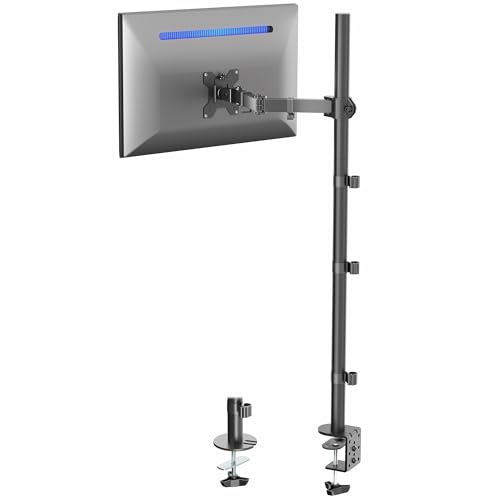 Best for ultrawide displaysVIVO Extra Tall Single Monitor Desk Mount, Up to 38-Inch UltrawideView on Amazon
- 5
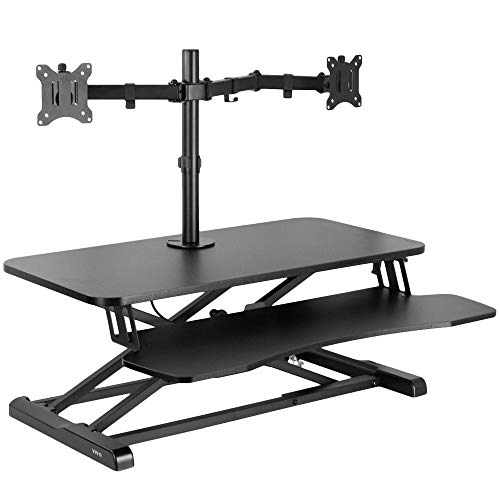 Best for a converter setupVIVO Standing Desk Converter with Dual Monitor Stand, 32-Inch Black TopView on Amazon
- 6
 Best simple single-monitor armAmazon Basics Single Computer Monitor Stand with Cable ManagementView on Amazon
Our Top Picks
| Product | Best for | Key feature |
|---|---|---|
| HUANUO FlowLift Dual Monitor Stand | Dual screens with full motion | Full motion, clamp or grommet |
| VIVO Dual Monitor Desk Mount | Two monitors on a budget | Holds 22 lbs each |
| ErGear Single Monitor Arm | Single monitor, tidy setup | Built-in cable management |
| VIVO Extra Tall Single Monitor Desk Mount | Ultrawide monitors | 39-inch pole height |
| VIVO Standing Desk Converter with Dual Monitor Stand | Adding standing to an existing desk | Height-adjustable desktop platform |
| Amazon Basics Single Computer Monitor Stand | Simple, no-frills single screen | Tilt, rotation and height adjustment |
HUANUO FlowLift Dual Monitor Stand, Fully Adjustable Gaming Monitor Desk Mount
HUANUO FlowLift™ Dual Monitor Stand, Fully Adjustable Gaming Monitor Desk Mount for 13–32″ Computer Screens, Full Motion VESA 75×75/100×100 with C-Clamp & Grommet Base, Each Arm Holds 4.4 to 19.8 lbs
Best for: Dual screens with full motion
This suits people who run two screens of 13 to 32 inches and want to pan, tilt and rotate each one independently. The listing specifies a range of 4.4 to 19.8 lbs per arm and VESA 75×75 and 100×100 compatibility.
Pros
- Full motion adjustment for each screen
- Clamp and grommet base options
Cons
- Heavier monitors may exceed the lower weight limit
VIVO Dual Monitor Desk Mount, Articulating Adjustable Arm for 2 Monitors
VIVO Dual Monitor Desk Mount, for 13" to 30" Screens, Holds 22 lbs Each | Articulating, Adjustable Arm, Grommet or C-Clamp Mounting, Computer Stand for 2 Monitors, Black, STAND-V002
Best for: Two monitors on a budget
A good fit for two screens between 13 and 30 inches where the main goal is freeing desk space at a low overall cost. Each arm is rated to hold up to 22 lbs.
Pros
- Each arm rated for 22 lbs
- Grommet or C-clamp mounting
Cons
- Limited height range compared with taller models
ErGear Single Monitor Arm, Fully Adjustable Monitor Mount for 13–34 Inch Screens
ErGear Single Monitor Arm, Fully Adjustable Monitor Mount for 13–34 Inch Screens, Fast Install Computer Monitor Stand with Tool-Free VESA Mount, Cable Management, Holds 4.84 to 19.8 lbs
Best for: Single monitor, tidy setup
This is aimed at people with one screen from 13 to 34 inches who want a quick, tool-free install and cable routing built into the arm. The listing gives a range of 4.84 to 19.8 lbs.
Pros
- Tool-free VESA attachment
- Integrated cable management
Cons
- Clamp fit depends on desk edge thickness
VIVO Extra Tall Single Monitor Desk Mount, Up to 38-Inch Ultrawide
VIVO Extra Tall Single Monitor Desk Mount, Up to 38" Ultrawides | Holds 22 lbs, 39" Pole VESA Stand, Articulating, Adjustable Arm, Grommet or C-Clamp Mounting, Black, STAND-V011
Best for: Ultrawide displays
Designed for wide monitors up to 38 inches, with a 39-inch pole for users who need extra vertical reach. It holds up to 22 lbs.
Pros
- Tall pole suits ultrawide screens
- Articulating arm with grommet or C-clamp
Cons
- Tall pole needs stable desk clearance
VIVO Standing Desk Converter with Dual Monitor Stand, 32-Inch Black Top
VIVO Standing Desk Converter with Dual Monitor Stand, 32" Black Top | Desktop Holds 33 lbs, Height Adjustable, Wide Keyboard Tray, With Dual 13" to 30" Monitor Mount, Black Frame, DESK-V000K-M2
Best for: Adding standing to an existing desk
Useful if you already have a desk and want to convert it into a sit-stand setup with two monitors on top. The desktop is listed as holding 33 lbs.
Pros
- Converts an existing desk without replacing it
- Wide keyboard tray
Cons
- Takes up more desk surface than a clamp-on arm
Amazon Basics Single Computer Monitor Stand with Cable Management
Amazon Basics Single Computer Monitor Stand with Cable Management, Height Adjustable VESA Desk Arm Mount, Fully Adjustable Tilt and Rotation, Steel, Black, Fits 13-30" Screens
Best for: Simple, no-frills single screen
A plain steel VESA arm for one 13 to 30 inch screen, suited to people who want tilt, rotation and height adjustment without extra features.
Pros
- Fully adjustable tilt and rotation
- Includes cable management
Cons
- Fewer finish and mounting options than premium arms
Related reading
- Multi Monitor Standing Desk Options: 5 Best Picks for 2026
- Ergotron Standing Desk Mount: How to Choose and Install One (Step-by-Step)
- 6 Best Dual Monitor Stands for Standing Desk Setups in 2026
- Yoga at Desk Exercises: 10 Seated and Standing Moves for Work
- Vivo L Shaped Standing Desk: Setup, Fit and Buying Steps
About Lauren Holland
Lauren Holland is part of our editorial team and reviews and edits our fitness at work guides, checking product details against manufacturer specifications and owner feedback.




